
Audio Cutter: Cut MP3, M4A and WAV Online
Open an audio file, drag the two handles over the part you want and press Play section to check it. Cut and download sends back just that part, in the same format as your file.
Drop an audio file to cut
Drag file here or pick from your device
MP3, WAV, FLAC, M4A, AAC, OGG, OPUS, AIFF, AIF, WMA · up to 200 MB
How to
How to cut an audio file online
The waveform and the Play section preview run on your own device, so you can find the right spot before anything leaves it. Only when you click Cut and download does the file go to our server, which cuts out the part between the two handles and sends it back.
- 1
Pick the audio file
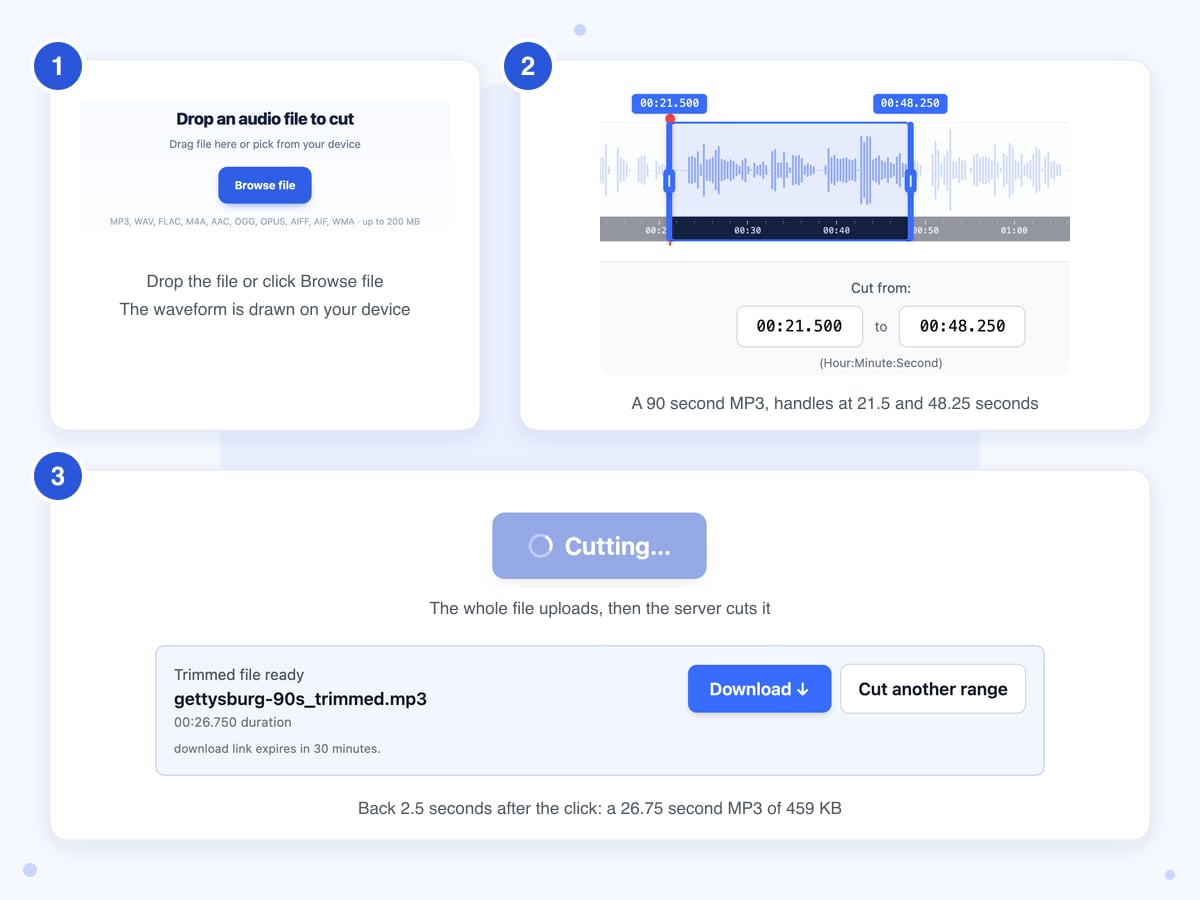
Drop the file on the box or click Browse file. The page reads it and draws the waveform, which took just over a second for our 90 second MP3, and the two blue handles start a little in from each end, 2 seconds on a file that long. If an orange line says the browser couldn't read the file, see the part below about WMA and AIFF.
- 2
Set the start and end
Drag the handles, or type into the Cut from and to boxes and press Enter. The boxes show minutes, seconds and thousandths, like 00:21.500, though the label under them says Hour:Minute:Second; plain seconds such as 21.5 work too. Click the waveform to move the red line, then press Play section to hear from there to the end handle.
- 3
Cut and download
Click Cut and download, and the button reads Cutting… while the whole file uploads and the server works; our three test files were back in 2 to 8 seconds. When Trimmed file ready appears, click Download, and use Cut another range for a second piece; it sets the handles back to the full length, and the file uploads again.
Guide
Cutting MP3, M4A and WAV files: start point, sound and file size
We measured where each cut began by lining it up against the original recording. In all three test files, an MP3, an M4A voice memo and a WAV, the sound starts at the exact moment we typed, so you can set the start in the gap before a word or a beat and it lands there.
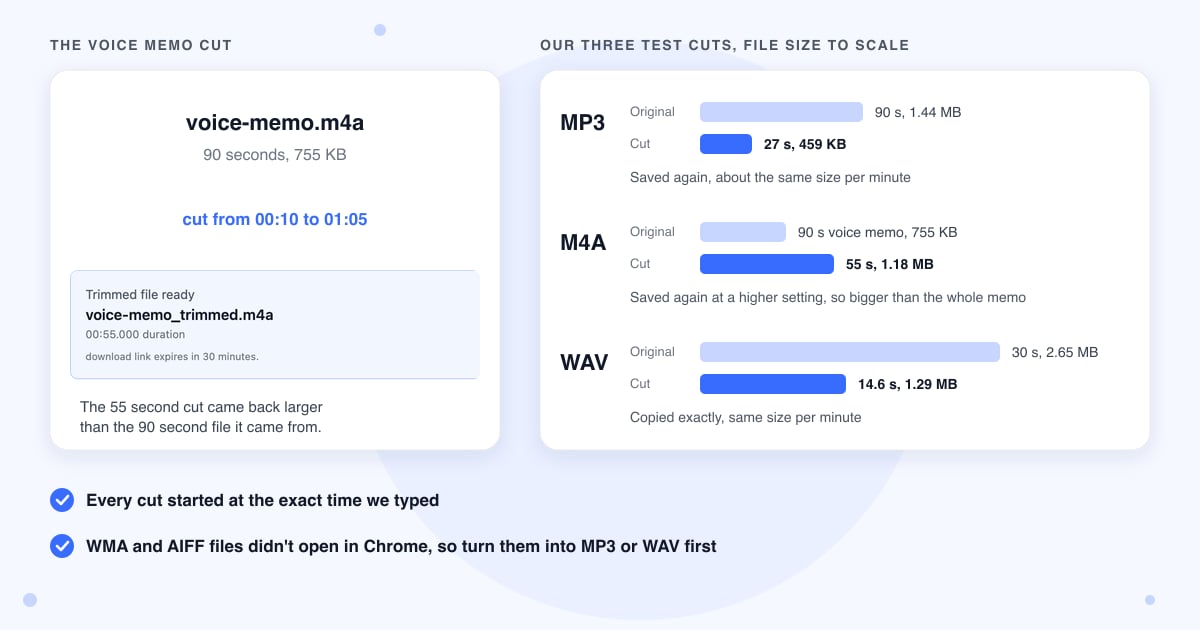
What changes from one format to the next is how the cut is made. A WAV is copied straight out of the original, while an MP3 or M4A is played through and saved again, and that second step is what decides the size of the file you get back.
Why a cut M4A can be bigger than the whole file
Phone voice memos are saved at a low setting to keep them small. The cutter saves every M4A at a much higher one, so our 55 second piece of a 90 second memo came out at 1.2 MB, while the full memo was 755 KB. Its loudness matched the original exactly, so the extra size comes only from the higher setting. If the size matters, for a message app with a limit say, run the cut through Compress Audio afterwards.
MP3 cuts are saved again at high quality
So that the cut can start at any moment you pick, the cutter saves the selected part of an MP3 again, at a high quality setting. Our test MP3 gave a 27 second cut of 459 KB, a little larger per minute than the original, with the same peak and average loudness.
WAV, FLAC, OGG and Opus are copied, not rebuilt
For these the cutter copies the chosen part without saving the sound again. Our 14.55 second WAV cut matched the original sample for sample, and it ran 32 thousandths of a second past the end point, a gap you won't hear. We only sent a WAV through the live tool, so treat the other three as untested, though FLAC, OGG and Opus files did open and draw a waveform in Chrome.
WMA and AIFF files won't open in Chrome
Chrome can't read these two formats, so the waveform stays empty and an orange line says "You can still try to trim it", but both buttons stay grayed out, and typing times does nothing. Turn the file into one Chrome can read first: WMA to MP3 for WMA, or AIFF to WAV for AIFF, which keeps it at full quality. We only tried Chrome, so another browser may behave differently.
Cutting the sound from an MP4
The upload box only takes audio files, so an MP4 video won't open here. Pull the sound out first with Extract Audio, which gives you an MP3, M4A or WAV, and cut that. If you want to keep the picture and just shorten the clip, use Cut Video instead. People sometimes search for an MP4A cutter, which is just an M4A file, and those open here as normal.
Long recordings and big files
The whole file uploads when you click Cut and download, even if you only want 10 seconds of a 2 hour podcast, and although the box says up to 200 MB, the network service in front of our server turns away uploads over about 100 MB. Before that, your browser unpacks the entire recording into memory to draw it, which by the code's math is about 1.3 GB for an hour of stereo sound, so a long file can make an older phone or laptop stall. The server also stops any cut that takes over 2 minutes, a limit our 2 to 7 second jobs were nowhere near; we haven't tried a recording longer than 90 seconds.
Last updated: 22 October 2026 · ChangeMyFile
Tested: 22 October 2026, headless Chrome 156 on a Mac against the live server, using the LibriVox public domain reading of the Gettysburg Address. MP3 (90 s, 1.44 MB, 128 kbps 44.1 kHz stereo) cut from 0:21.5 to 0:48.25: back 2.5 s after the click, 459,231 bytes, 26.750 s, MP3 at about 137 kbps, start exact to within 1/8000 s by cross-correlation, mean and peak loudness unchanged (-26.0 dB, -1.0 dB). M4A voice-memo style file (90 s, 755 KB, AAC 64 kbps mono 48 kHz) cut from 0:10 to 1:05: back in 7.6 s, 1,184,057 bytes, 55.000 s, AAC about 172 kbps, start exact, loudness unchanged. WAV (30 s, 2.6 MB, 16-bit mono 44.1 kHz) cut from 0:03.25 to 0:17.8: back in 1.8 s, 1,286,414 bytes, 14.582 s, every sample identical to the source from 3.250 s. Load-only checks with no cut sent: FLAC, OGG, Opus and AAC drew a waveform; WMA and AIFF showed the decode message with both buttons disabled.
FAQ
Audio cutter questions
At a glance
- Where it runs
- On our server; the waveform in your browser
- Files you can add
- MP3, M4A, WAV, FLAC, AAC, OGG, Opus, AIFF, WMA
- Result
- Same format, name ends in _trimmed
- Size limit
- About 100 MB, one file at a time
- Start point
- Exact in our MP3, M4A and WAV tests
- Shortest cut
- A tenth of a second
- Time
- 2 to 8 seconds in our tests
- Download link
- Works for 30 minutes
- Files deleted
- Your upload once the cut is done, the rest in a nightly cleanup
- Account
- Not needed
Can't find your answer? Visit our Help center.