
Split PDF
Click between pages where each new PDF should start, or type the page numbers, and download every part.
Select 1 PDF to split
Drop your PDF here
Drag file here or pick from your device
How to
How to split a PDF into separate files
You need one PDF that opens without a password.
- 1
Add the PDF
Drop the file onto the upload box, or click Browse file to pick it from your device. A thumbnail of every page appears in order.
- 2
Place the cuts
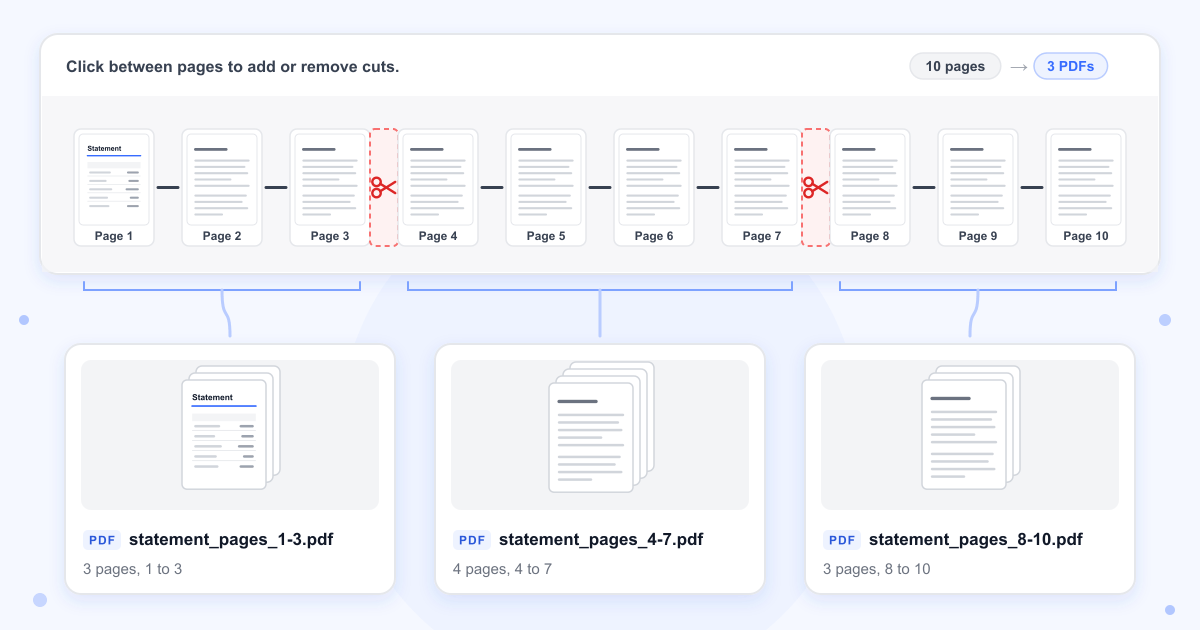
Click the gap after any page to put scissors there, and click it again to take them away. You can also type the page numbers into the box under the thumbnails. The counter above the pages shows how many PDFs you will get.
- 3
Split and download
Click the Split into button, which shows the number of files, for example Split into 3 PDFs. Download the parts one at a time or with Download All. The PDF on your device is not changed.
Guide
How cutting a PDF into parts works
A cut always goes after a page. The current part ends there and the next one starts on the following page, so cuts after pages 3 and 7 of a 10-page file give you pages 1 to 3, 4 to 7 and 8 to 10. Each part is a separate PDF named after the original with its page range added, which means statement.pdf comes back as statement_pages_1-3.pdf, statement_pages_4-7.pdf and statement_pages_8-10.pdf.
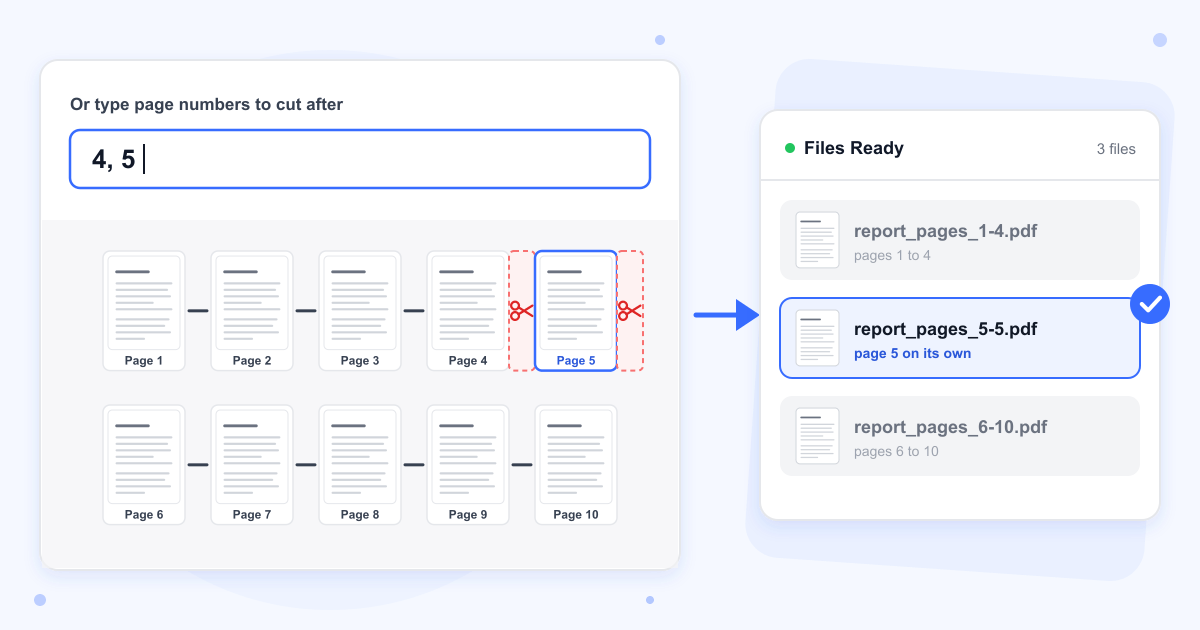
The page number box reads every number you type and ignores everything else, so commas, spaces and dashes all work as separators. That also means 3-7 is read as two cuts, after page 3 and after page 7, and not as a range. To get pages 3 to 7 in one file, type 2, 7.
Taking out one page or a range
Put a cut on each side of what you want. Cuts after pages 4 and 5 left page 5 alone in report_pages_5-5.pdf, with the pages before and after it in two other files that you can skip. To move that page somewhere else in a document, put the parts back together in a new order with Merge PDF.
Page sizes, text and images
Pages are copied into the new files without being redrawn. In our test, A4, US Letter and landscape pages kept their sizes, the text could still be selected, and the photo in each part was byte for byte the same as in the original. Web links stayed clickable.
Bookmarks, links between pages and forms
The parts have no bookmarks, and a link that jumps to another page of the document stops working, even when both pages land in the same part. The title and author saved in the original are dropped too. Fillable form fields can't be filled in any more, but what was already typed into them still shows on the page.
Locked PDFs and large files
A PDF that asks for a password before it opens can't be split, and the page shows Could not read this PDF under the upload box. Unlock it first with Remove PDF Password. A PDF that opens normally but blocks printing or copying splits as usual, and in our test its parts came back with nothing blocked. Files over 100 MB can't be split.
Last updated: 16 October 2026 · ChangeMyFile
Tested: 16 October 2026. Split a 10-page PDF with A4, US Letter and landscape pages, a photo, bookmarks, web and page links and a filled form, cutting after pages 3 and 7: three PDFs came back with 3, 4 and 3 pages, every page at its original size and the photo unchanged. Cut after pages 4 and 5 to get page 5 on its own, split the same file with no cuts into 10 single pages, and split a 120-page file with 100 cuts into 101 parts. A PDF with an open password was refused, a PDF that only blocked printing and copying split normally, and a 105 MB file was rejected. Each split took under a second.
FAQ
Split PDF questions
At a glance
- Size limit
- 100 MB
- Cuts per split
- Up to 100
- Where it runs
- Our server
- Files deleted
- Within 24 hours
- Account
- Not needed
- Watermark
- None
Can't find your answer? Visit our Help center.