
Compress PDF
Make a PDF smaller for email or an upload form. Choose how much to compress, then compare the old and new size.
Select PDF files to compress
Drop your PDFs here
Drag files here or pick from your device
How to
How to compress a PDF
Every PDF you add in one go is compressed at the same level, so run files that need different settings separately.
- 1
Add your PDFs
Drop them onto the upload box or click Browse files. The bar above the levels shows how many files you added and their combined size.
- 2
Pick a level and click Compress PDF
Recommended is selected when the page opens. Switch to Strong compression for the smallest file, or to Light compression when the PDF is going to a printer.
- 3
Check the new size and download
The results page lists each file with its size before and after. Click Download, or Download All for a batch. A file named report.pdf comes back as report_output.pdf.
Guide
How much a PDF compressor can shrink your file
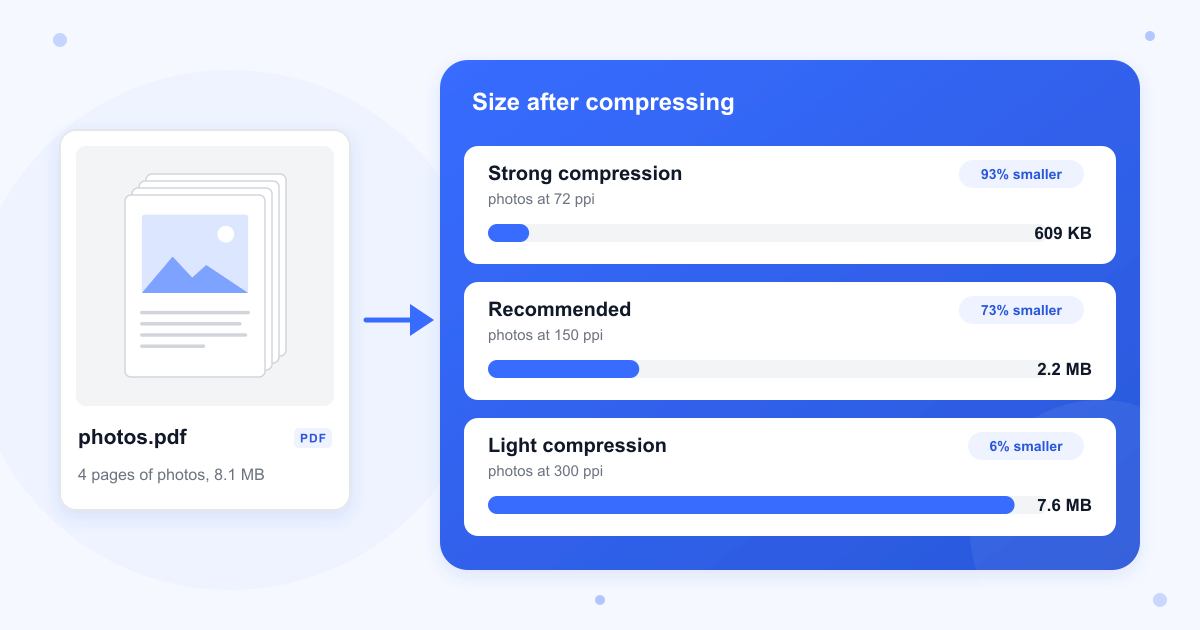
Almost all of the weight in a large PDF is pictures: photos, scanned pages, screenshots. Our server rebuilds the file with Ghostscript, an open-source PDF engine, which lowers the resolution of each picture and saves it again as a JPEG. Text, fonts and drawn lines are copied over as they are, so the level you choose makes a big difference to a scan or a photo report and very little to a typed document.
If you are trying to get under an upload limit, start with Recommended and look at the new size on the results page. If it is still too big, go back and run the same file at Strong compression.
What each level does to images
Strong compression saves pictures at 72 pixels per inch at the size they are printed on the page, Recommended at 150 and Light compression at 300. Strong and Recommended use the same JPEG quality, so the only difference between them is resolution. Light compression also uses a finer JPEG setting, which is part of why our photo PDF only lost 6% at that level.
Scanned documents
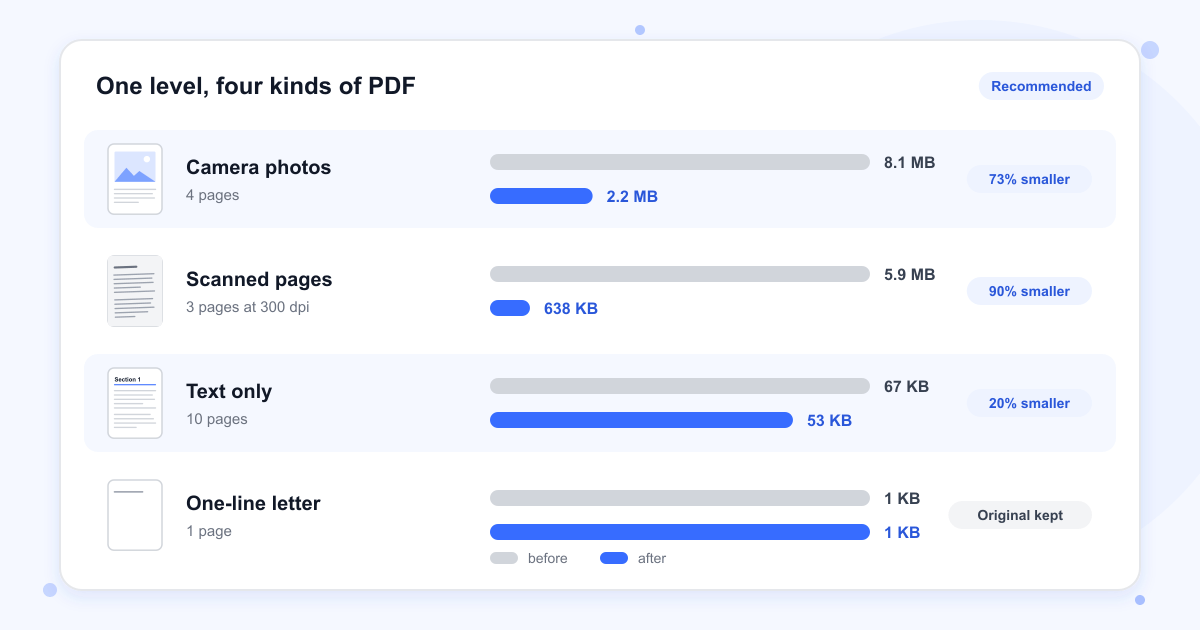
A scan is one big picture per page, so it shrinks the most. Our three 300 dpi pages went from 5.9 MB to 638 KB at Recommended and stayed crisp. At Strong compression they came down to 240 KB and 10 point text was still readable, but the letters had rough, blurred edges.
Text-only PDFs barely shrink
A PDF made from Word or a web page is mostly text, and there is little to take out. Our 10-page text file went from 67 KB to 53 KB at Strong and Recommended and to 61 KB at Light. The text stayed selectable, the embedded fonts were kept, and lines and shapes stayed sharp at any zoom.
When the file can't get any smaller
If the compressed copy would be the same size or bigger, you get your original PDF back unchanged, under its own name, and the results page marks it as already optimized. In our test a one-page letter of 1 KB came back this way.
Bookmarks, links and fillable forms
Bookmarks, web links and the title and author stored in the file all survive. Fillable form fields do not: the answers typed into them stay printed on the page, but the boxes can no longer be edited. Fill in and finish a form before you compress it, and keep the fillable original.
Last updated: 16 October 2026 · ChangeMyFile
Tested: 16 October 2026. Compressed a 4-page PDF of camera photos (8.1 MB), three 300 dpi scanned pages (5.9 MB) and a 10-page text PDF with two embedded fonts, bookmarks, a link and a filled-in form (67 KB) at all three levels, and checked image resolution, text, fonts, bookmarks, links, form fields and metadata in each result. Ran a 1 KB one-page letter, a batch of three files, a PDF that blocks printing without a password, a password-protected PDF, a text file renamed to .pdf and a 107 MB batch. Most runs took 1 to 7 seconds, and the photo PDF took 17 seconds at Light compression.
FAQ
Compress PDF questions
At a glance
- Levels
- Strong, Recommended, Light
- Files per run
- Up to 20
- Upload limit
- 100 MB per run
- Where it runs
- Our server
- Files deleted
- Within 24 hours
- Account
- Not needed
Can't find your answer? Visit our Help center.