
Passport Photo Maker
Crop a headshot to the size your passport or visa office asks for. 52 passport and visa presets, from the US 2 x 2 inch to the UK and Schengen 35 x 45 mm. The crop runs in your browser, so the photo isn't uploaded.
Drop a headshot to start
Drag image here or pick from your device
Max file size: 50MB
How to
How to make a passport photo online
You need a straight-on headshot taken against a plain wall, with the whole head and the tops of the shoulders in the frame.
- 1
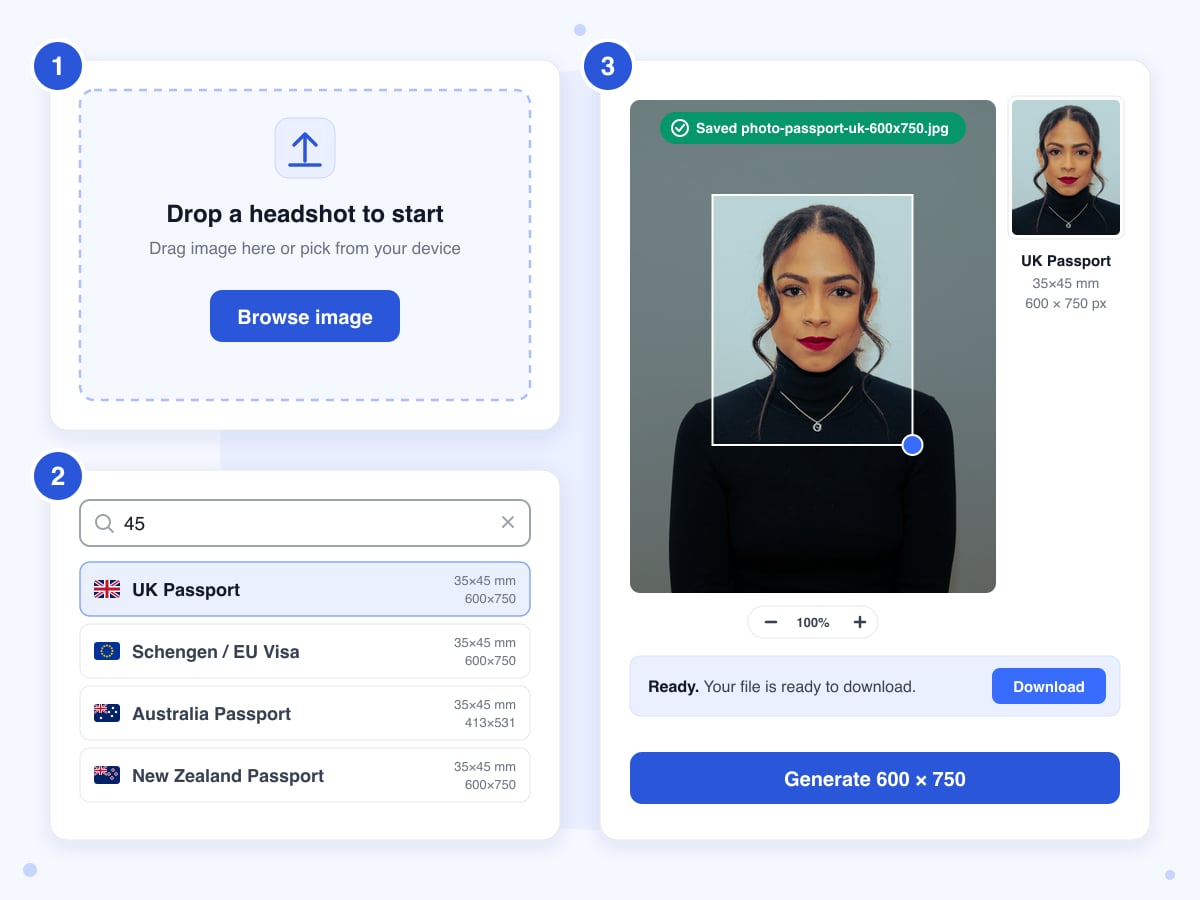
Upload the headshot
Drop the photo on the upload box or click Browse image, and the editor opens over the page with the US Passport preset selected and a crop frame already centred on the picture.
- 2
Pick the country and place the frame
Type a country, a number from the size such as 45, or a pixel size such as 600x750 into the search box and click the preset. The frame snaps to that shape, and the shape stays locked while you drag it over the face and pull the blue corner handle to resize it, so the proportions stay right as long as the frame stays inside the photo. Leave room above the hair and keep the chin inside.
- 3
Generate and download
Click Generate and the crop is redrawn at the preset's pixel size, then saved under your file's name plus the preset and size, for example photo-passport-uk-600x750.jpg. The download starts on its own, and the Download button at the bottom of the editor saves another copy whenever you need one.
Guide
Passport photo size in pixels, mm and inches: what the presets do
Every passport office publishes two numbers: a print size in millimetres or inches, and, for online applications, a pixel size for the digital file. The presets carry both. Pick a country and the crop frame takes that shape; Generate then scales your crop to the preset's pixel count, so a US photo comes out at 600 x 600 pixels and a UK one at 600 x 750, whatever size the original was.
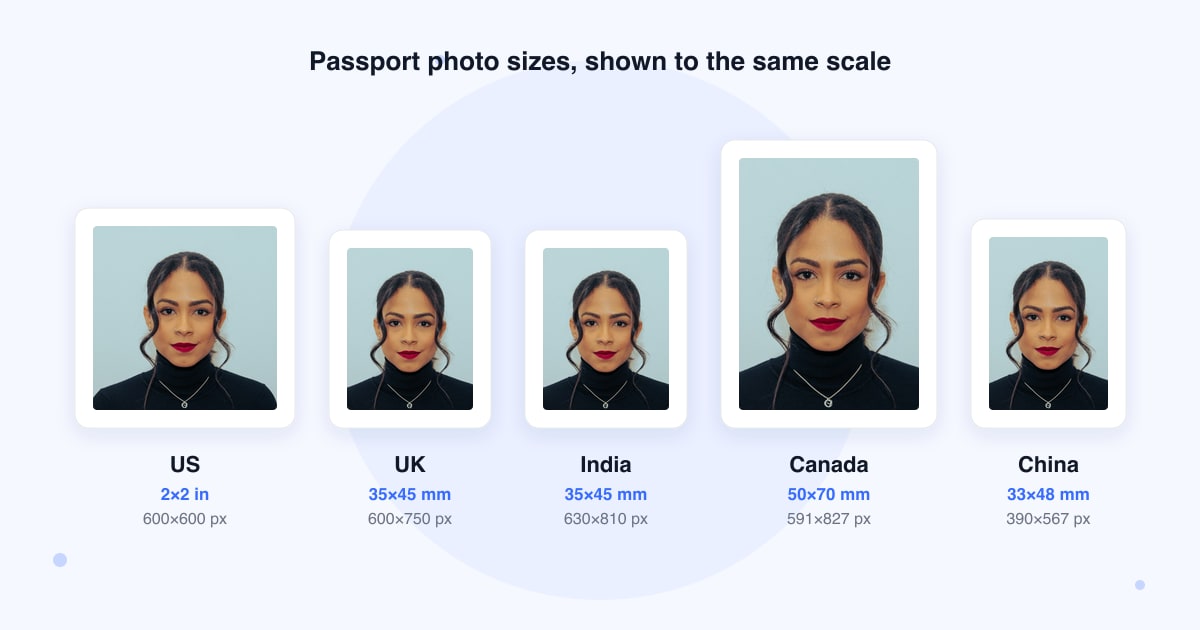
That settles the one rule a tool can settle, the size, while the other rules are about the picture itself: a plain light background, no shadows, a neutral face with the eyes open, nothing covering the head, and a photo taken within the last six months. Most of these rules come from ICAO, the UN agency behind the international passport photo standard, and each country adds its own details. The tool doesn't check any of them, so read your office's list before you shoot, and treat the result as your own photo to check rather than an approved one.
The five presets we checked against the official pages
US (travel.state.gov): 2 x 2 inches, digital file 600 to 1,200 pixels square. UK (gov.uk): at least 600 x 750 pixels, 50 KB to 10 MB. Canada (canada.ca): 50 x 70 mm print. Australia (passports.gov.au): 35 to 40 mm wide and 45 to 50 mm high. India (passportindia.gov.in): 35 x 45 mm, 630 x 810 pixels, white background. The other 47 presets use the sizes commonly quoted for those countries, so confirm them on your office's site before you rely on one.
Head size is yours to judge
The frame fixes the shape of the photo, not how big the head is inside it. The US wants the head at 50 to 69 percent of the image height, Canada wants the face 31 to 36 mm tall on the print, Australia 32 to 36 mm, and India wants the face filling 80 to 85 percent. Zoom in with the buttons at the bottom of the preview and size the frame so the head takes the share your office lists, since head height is checked as a rule of its own.
Online applications may want more pixels
Some offices set an upload minimum that's larger than the preset, which was built around the printed size. Canada's online renewal asks for at least 1,200 x 1,800 pixels and New Zealand's for at least 900 x 1,200, while the Canada preset makes 591 x 827 and the New Zealand one 600 x 750. Those sizes are fine for a print. For the upload, crop a high-resolution original with Crop Image to the shape the form asks for, 2:3 for Canada and 3:4 for New Zealand, which is not quite the preset's shape.
The background stays as it was
Generate copies the pixels inside the frame and changes nothing else, so a cream wall stays cream and a shadow stays a shadow. For a white background, run the photo through Background Remover first and upload the transparent PNG here: the see-through area is filled with white when the photo is made. The Remove BG tab inside this editor does the same job on our server, but its result can't be handed to the Passport tab, so download it and upload it again.
Printing the file
The file carries pixels and no DPI value, so a print app may offer it at any size. Set the print size to the preset's millimetres yourself: 35 x 45 mm for a 600 x 750 UK file, 2 x 2 inches for a US one. To print several copies on one sheet, place the file a few times in your printer's layout or a word processor. Australia's office doesn't accept inkjet prints at all, so there a photo shop still does the printing.
Soft results come from small originals
If the frame covers fewer pixels than the preset needs, the crop is scaled up and the result looks soft. A 600 x 750 UK photo needs at least that many pixels inside the frame, which a phone photo taken from a couple of metres away may not have around the face. Shoot from closer, or at the camera's full resolution, and keep the image straight rather than tilted. An iPhone photo saved as HEIC is refused by the upload box; convert it with HEIC to JPG first.
Last updated: 21 October 2026 · ChangeMyFile
Sizes
Passport and visa photo sizes by country
These are the 52 presets in the tool, with the print size and the pixel size of the file it makes. The five marked checked were compared with the official pages on 21 October 2026. For the rest, confirm the size on your passport or visa office's site before you print or upload.
| Country and document | Print size | Pixels |
|---|---|---|
| US Passportchecked | 51×51 mm | 600 × 600 |
| US Visa | 51×51 mm | 600 × 600 |
| UK Passportchecked | 35×45 mm | 600 × 750 |
| Schengen / EU Visa | 35×45 mm | 600 × 750 |
| Canada Passportchecked | 50×70 mm | 591 × 827 |
| Australia Passportchecked | 35×45 mm | 413 × 531 |
| New Zealand Passport | 35×45 mm | 600 × 750 |
| India Passportchecked | 35×45 mm | 630 × 810 |
| India Visa | 51×51 mm | 600 × 600 |
| China Passport | 33×48 mm | 390 × 567 |
| China Visa | 33×48 mm | 390 × 567 |
| Japan Passport | 35×45 mm | 413 × 531 |
| South Korea Passport | 35×45 mm | 413 × 531 |
| Singapore Passport | 35×45 mm | 400 × 514 |
| Malaysia Passport | 35×50 mm | 413 × 591 |
| Thailand Passport | 35×45 mm | 413 × 531 |
| Philippines Passport | 35×45 mm | 413 × 531 |
| Indonesia Passport | 35×45 mm | 413 × 531 |
| Vietnam Passport | 40×60 mm | 472 × 709 |
| Pakistan Passport | 35×45 mm | 413 × 531 |
| Bangladesh Passport | 45×55 mm | 531 × 649 |
| Sri Lanka Passport | 35×45 mm | 413 × 531 |
| Nepal Passport | 35×45 mm | 413 × 531 |
| UAE Passport | 40×60 mm | 472 × 709 |
| UAE Visa / ID | 35×45 mm | 413 × 531 |
| Saudi Arabia Visa | 51×51 mm | 600 × 600 |
| Country and document | Print size | Pixels |
|---|---|---|
| Turkey Passport | 50×60 mm | 591 × 709 |
| Russia Passport | 35×45 mm | 413 × 531 |
| Ukraine Passport | 35×45 mm | 413 × 531 |
| Germany Passport | 35×45 mm | 600 × 750 |
| France Passport | 35×45 mm | 600 × 750 |
| Italy Passport | 35×45 mm | 600 × 750 |
| Spain Passport | 26×32 mm | 307 × 378 |
| Netherlands Passport | 35×45 mm | 600 × 750 |
| Belgium Passport | 35×45 mm | 600 × 750 |
| Switzerland Passport | 35×45 mm | 413 × 531 |
| Sweden Passport | 35×45 mm | 413 × 531 |
| Norway Passport | 35×45 mm | 413 × 531 |
| Denmark Passport | 35×45 mm | 413 × 531 |
| Finland Passport | 36×47 mm | 500 × 653 |
| Ireland Passport | 35×45 mm | 413 × 531 |
| Portugal Passport | 35×45 mm | 413 × 531 |
| Poland Passport | 35×45 mm | 413 × 531 |
| Czechia Passport | 35×45 mm | 413 × 531 |
| Greece Passport | 40×60 mm | 472 × 709 |
| South Africa Passport | 35×45 mm | 413 × 531 |
| Nigeria Passport | 35×45 mm | 413 × 531 |
| Kenya Passport | 51×51 mm | 600 × 600 |
| Egypt Passport | 40×60 mm | 472 × 709 |
| Brazil Passport | 50×70 mm | 591 × 827 |
| Mexico Passport | 35×45 mm | 413 × 531 |
| Argentina Passport | 40×40 mm | 472 × 472 |
FAQ
Passport photo questions
At a glance
- Photos you can upload
- JPG, PNG, WebP
- Upload limit
- 50 MB
- Presets
- 52, for 47 countries plus Schengen
- Result
- JPG at the preset's exact pixels
- Background
- Unchanged
- Print sheet
- None, one photo per file
- Where it runs
- In your browser
- Account
- Not needed
- Watermark
- None
Can't find your answer? Visit our Help center.