
AI Image Upscaler
Upload a small or compressed photo, pick 2x or 4x, and download a bigger PNG with the blocks and soft edges cleaned up.
Drop an image to upscale
Drag image here or pick from your device
Max file size: 50MB
How to
How to upscale an image
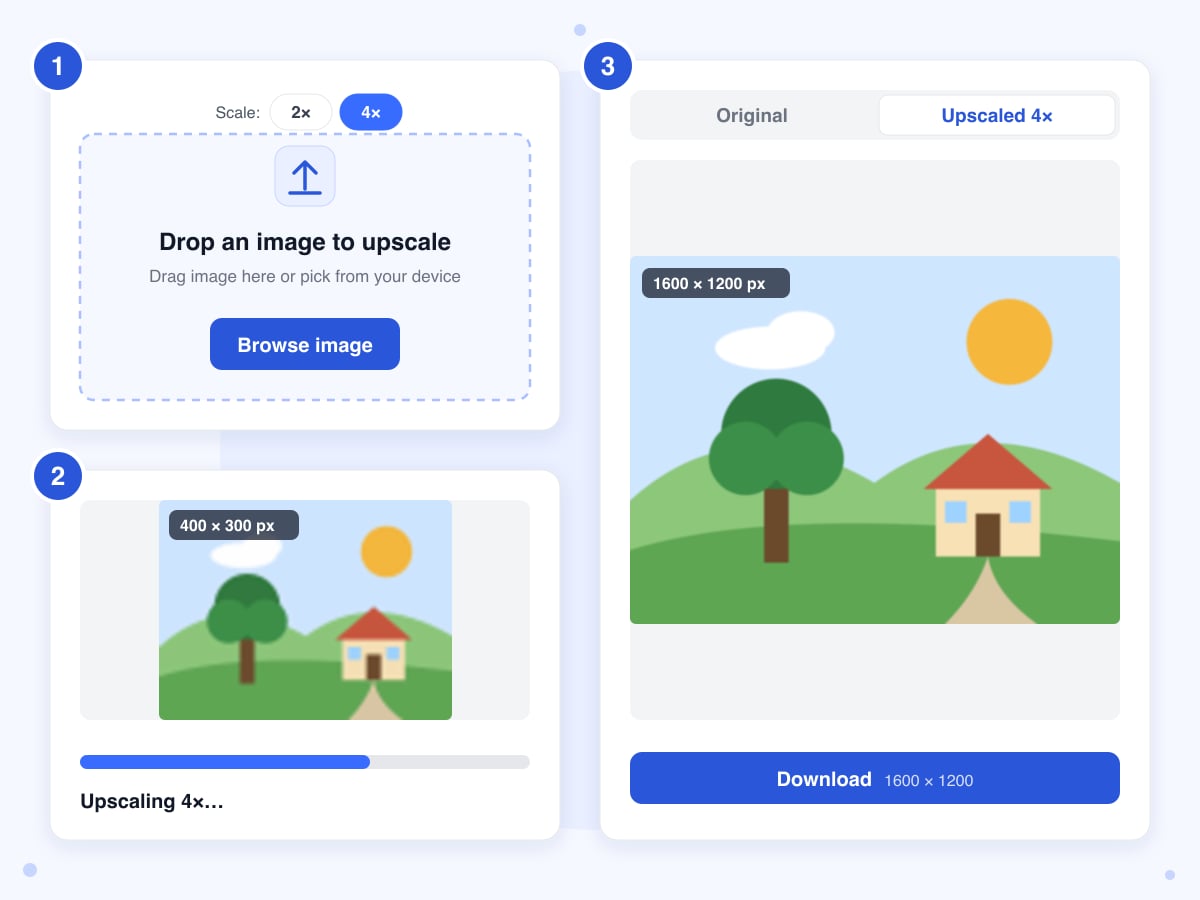
Choose the scale before you upload, because dropping the image in starts the job straight away.
- 1
Pick 2x or 4x
The two scale buttons sit above the upload box: 2x doubles the width and height of the image, while 4x quadruples them. The buttons disappear once an image is in, so if you change your mind, close the result panel and start again with the other scale.
- 2
Upload the image
Drag it anywhere on the page or click Browse image and pick it from your device. The upload starts the job immediately, and the panel shows Upscaling while the AI works on the image.
- 3
Compare and download
The view switches to the Upscaled tab when the result is ready, and the Original tab stays available for comparison. Click Download, which on a desktop also shows the new size in pixels, and save the file soon, because the link stops working after 30 minutes.
Guide
Upscaling an image with AI: what gets better and what doesn't
Resizing a small image upward in a normal editor only stretches the pixels it already has, so edges go soft and JPG blocks grow along with everything else. An AI upscaler works differently. A model trained on pairs of small and large photos guesses the detail a bigger version would have had and paints it in, which is why a photo a few hundred pixels wide can come back four times the size and still look like a photo.
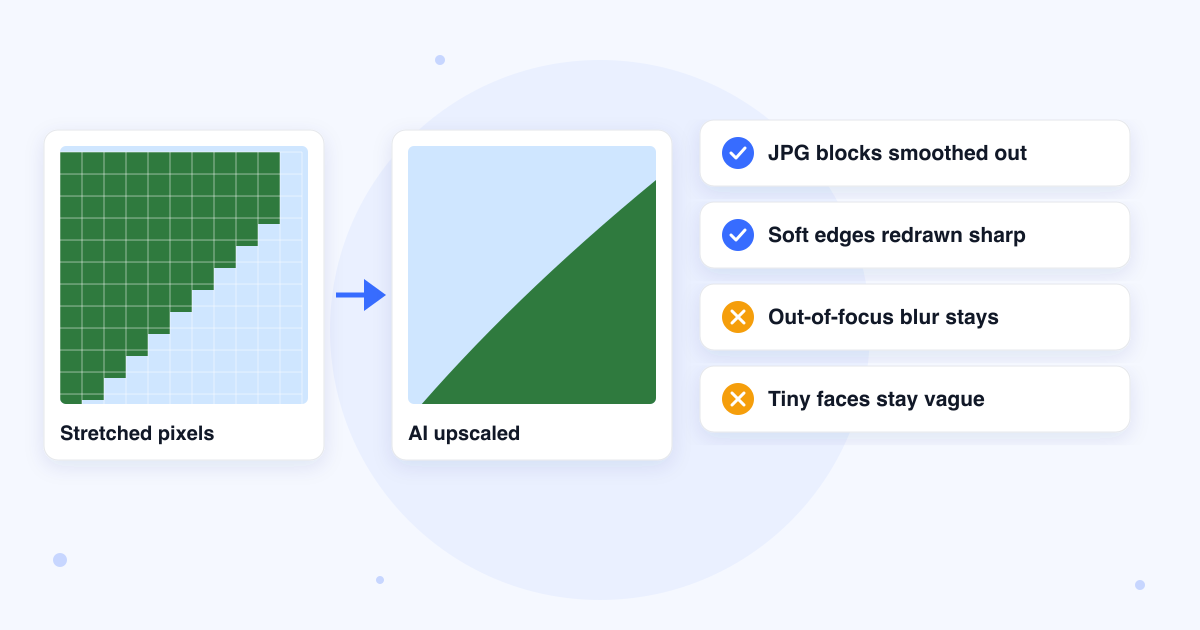
That guessing is also the limit. The model can only sharpen what it can make out, and anything it invents is a plausible fill rather than a recording of the scene. Treat the result as a cleaner, bigger copy, and look closely at the parts that matter before you print or publish it.
Pick 2x unless the picture is tiny
In our tests the 2x and 4x results looked alike at the same zoom; 4x has four times the pixels and a file about three times larger, but no extra detail. 2x is the right choice for any photo over about 1,000 px wide. Keep 4x for thumbnails, icons and WhatsApp-sized photos that you want to print or crop in on.
Big photos are shrunk before they're upscaled
The model runs on a GPU with a fixed memory ceiling, so our server scales any image over 2 megapixels down to that size before sending it. A 12 megapixel phone photo at 2x therefore comes back at about 8 megapixels, bigger than the original but not 48, and a 1,920 x 1,080 screenshot at 2x lands just under 4K at 3,770 x 2,120 px. For photos that size, the pass is more of a clean-up than an enlargement.
4x on a big photo can fail
A 4x run multiplies the pixel count by sixteen, and in our test a 3,200 px wide photo at 4x came back with an out-of-memory error from the GPU instead of an image. If that happens, close the panel, pick 2x, which asks the GPU for a quarter of the pixels, and upload the photo again, or resize it to under 1,000 px first and run 4x on that.
Blur and noise mostly stay as they are
The upscaler is built for images that are small or heavily compressed but otherwise sharp. In our test it removed the JPG blocks and smoothed the skin, while fine scratches on a jacket came back sharper, since the model treats them as detail worth keeping. A photo that's out of focus or shaken comes back bigger and still blurry, and a face that's only a few pixels wide won't turn into a real face. For a worn scan with soft faces, Restore Old Photos is the better tool.
Upscaling for print
Printers want about 300 pixels per inch for a sharp print. A 600 x 400 px web photo covers only 2 x 1.3 inches at that density; at 4x it becomes 2,400 x 1,600 px, enough for an 8 x 5 inch print. The AI can't add detail that the camera never captured, so view the result at full size before you order a large print.
Transparent PNGs and logos
A PNG with a transparent background keeps its transparency, which we checked with a small logo at 2x. The edge of the shape comes back slightly soft, so if the logo exists as an SVG or a bigger PNG, that source will beat an upscale. Very large transparent PNGs lose their transparency, because they're flattened when they're shrunk for the GPU.
Last updated: 21 October 2026 · ChangeMyFile
Tested: 21 October 2026, four runs. A 480 x 259 px JPG (23 KB) of a family photo at 2x: done in 12.2 seconds, back as a 960 x 518 px PNG of 821 KB, with the JPG blocks gone and the faces smoother. The same file at 4x: 13.5 seconds, 1,920 x 1,036 px, 2.7 MB, no more detail than the 2x at the same zoom, and the fine scratches on the man's jacket sharpened rather than removed. A 3,200 x 1,805 px JPG at 4x: failed after 17.9 seconds with a GPU out-of-memory error from the model. A 320 x 240 px PNG logo with a transparent background at 2x: 10.9 seconds, 640 x 480 px, transparency kept, edge slightly soft. The model reported for every run was nightmareai/real-esrgan.
FAQ
Image upscaler questions
At a glance
- Images you can upload
- JPG, PNG, WebP
- Upload limit
- 50 MB
- Images at a time
- One
- Scale
- 2x or 4x
- Result
- PNG
- Biggest result
- About 8 megapixels at 2x
- Time
- 11 to 14 seconds in our tests
- Model
- Real-ESRGAN
- Where it runs
- Our server and Replicate's AI service
- Files deleted
- Within 24 hours
- Account
- Not needed
- Watermark
- None
Can't find your answer? Visit our Help center.