
Merge Audio Files
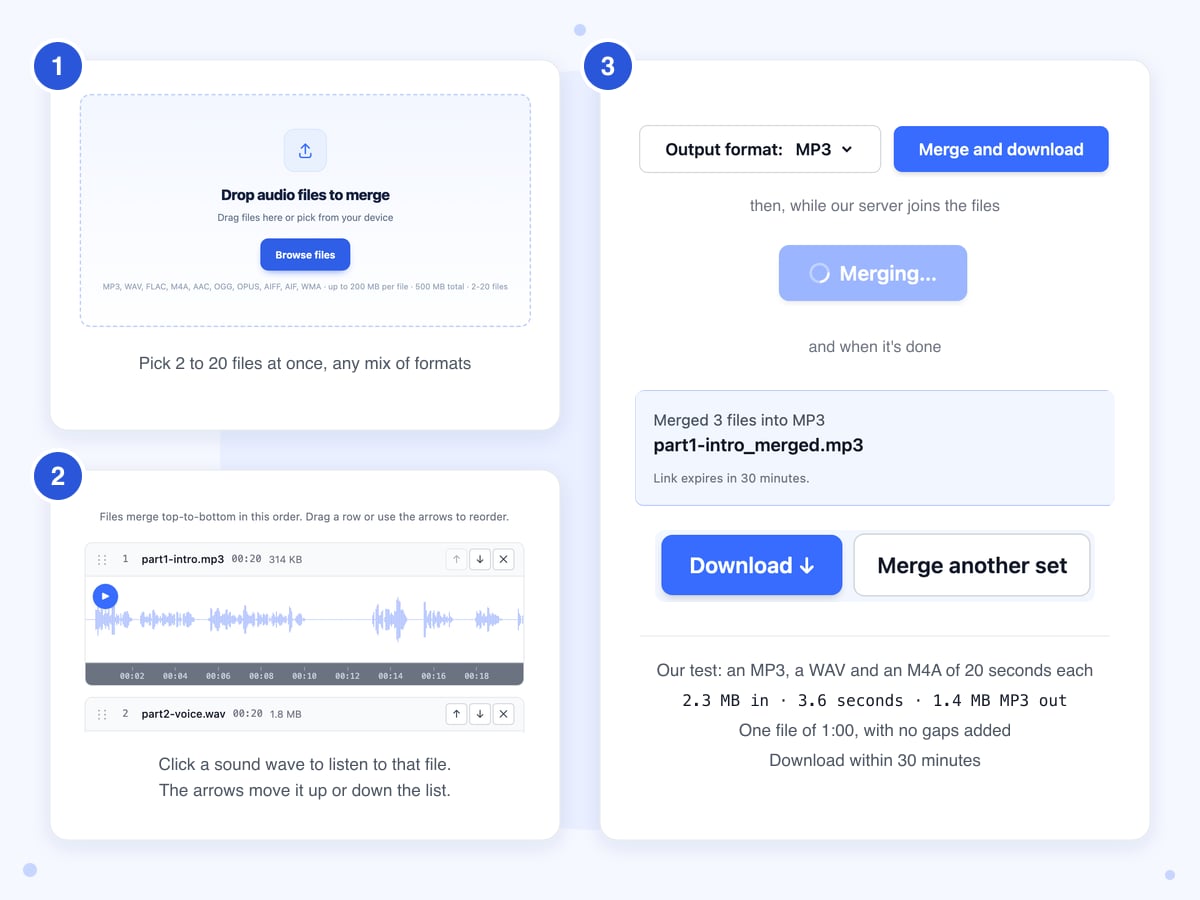
Add 2 to 20 audio files, put them in the order you want and click Merge and download. Our server plays them one after another into a single MP3, WAV, M4A or FLAC file, with nothing added between them.
Drop audio files to merge
Drag files here or pick from your device
MP3, WAV, FLAC, M4A, AAC, OGG, OPUS, AIFF, AIF, WMA · up to 200 MB per file · 500 MB total · 2-20 files
How to
How to combine audio files into one
You can mix formats in one batch, so a WAV from a recorder, an MP3 song and an M4A voice memo can all go into the same file.
- 1
Add the files
Click Browse files and select all the parts at once, or drop them on the box. Each file appears as a numbered row showing its length, its size and a picture of its sound, and the Add more files button places any extra files at the bottom of the list.
- 2
Check the order
The numbers on the left are the order the parts will play in, top to bottom. Click a sound wave to hear that file from the spot you clicked, which is the quickest way to tell "chapter 2" from "chapter 3" when the names don't help. To change the order, drag a row to its new position or use the up and down arrows beside it.
- 3
Choose a format and merge
Pick the format under Output format, then click Merge and download; the button reads Merging... during the whole upload and while our server joins the files. When the blue box says Merged 3 files into MP3 (or however many you added), click Download to save the file.
Guide
Joining MP3, WAV and M4A files: what the merged file sounds like
Merge Audio plays your files one after another into a single new file. Before that, the page reads each file in your browser to draw its sound wave and let you play it, but the joining happens on our server, which saves the result in the format you picked. That means every part is saved again, even when all the files are MP3s.
We tested it on 22 October 2026 with a public domain reading of the Gettysburg Address, cut into parts and saved in six different formats. The notes below come from those three merges and from the code behind the page.
The first file decides stereo or mono
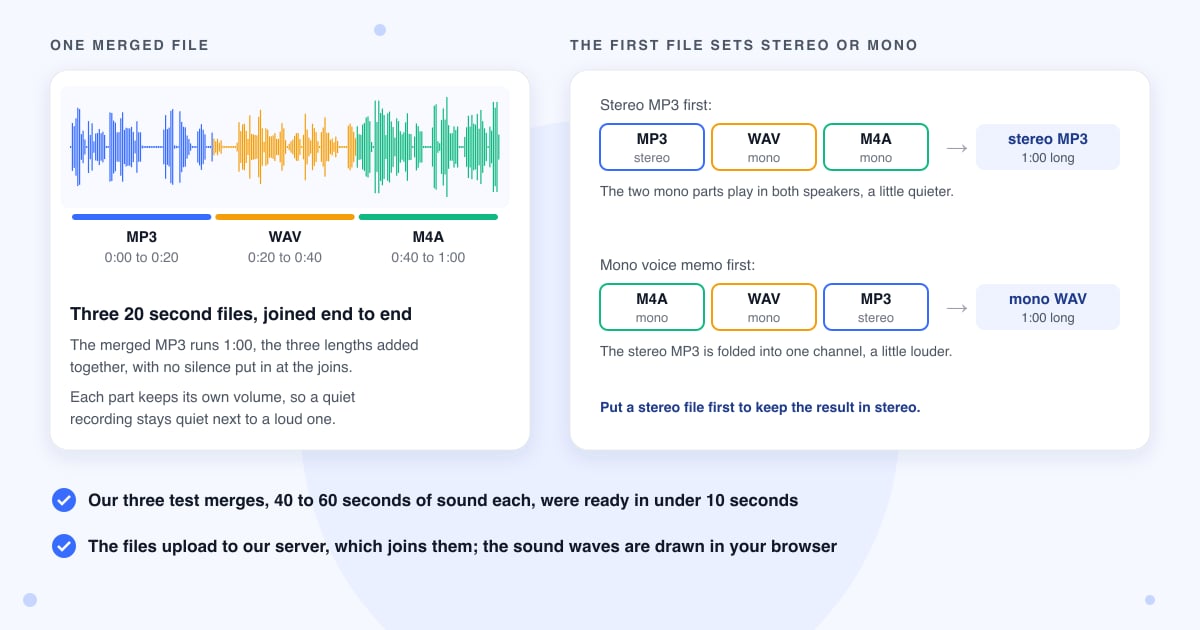
Most music is stereo, with separate left and right sides, while phone voice memos and many recorders save mono, a single channel. In both of our tests, the merged file followed the first file in the list. With a stereo MP3 on top, the result was stereo, and the mono parts played equally in both speakers. With a mono voice memo on top, the stereo MP3 later in the list was folded down to mono. So if any of your files is stereo and you want to keep it that way, move a stereo file to the top before you merge.
No gaps, fades or volume changes are added
The parts are butted together exactly: our three 20 second files came back as a file of 1:00, with no silence put in at the joins and no fade in or out. The tool doesn't even out loudness either, so a quiet recording stays quiet next to a loud one. The only change we measured came from the stereo or mono switch above, which made the parts that didn't match the first file slightly quieter or louder, a small step you might notice on headphones. If one recording has a long silence at the end, trim it first with Audio Cutter.
Which format to save as
MP3 is the default and plays anywhere; our merged MP3 worked out at about 1.4 MB per minute of sound, and M4A came out about the same. WAV is for audio editors and is far bigger, about 6 MB a minute for mono and about 10 MB for stereo. FLAC keeps full quality in a smaller file than WAV, and OGG and Opus are mainly for web and Android players. Saving as WAV or FLAC keeps what's there, but it can't bring back detail that was lost when a part was first saved as MP3. The name of the merged file comes from the first file, with _merged added to the end.
When a row says "can't preview this file"
Chrome can't play WMA or AIFF files, so in our test those rows showed "can't preview this file" instead of a sound wave, and they had no length next to the name. The merge still works, because our server reads those formats. Our test batch of a WMA, a FLAC and an AIFF merged into one M4A of the right length. Since you can't listen to those rows first, check their order by name before you click Merge and download.
More than 20 files, or a whole audiobook
If you pick more than 20 files, only the first 20 make it into the list and the rest are left out without a message, so count the rows. To join 40 chapters, merge chapters 1 to 20, then 21 to 40, and finally merge the two halves. Each round saves the sound again, and the last upload has to fit the size limit below, so this works for a short audiobook, not a 10 hour one. M4B audiobook files and WebM recordings aren't on the list of accepted formats, so the page turns them away; convert a WebM first with WebM to MP3.
Big uploads and failed merges
All the files go to our server in one upload when you click the button, with no progress bar. The box says 200 MB a file and 500 MB in all, but the network service in front of our server turns away any upload over about 100 MB, so the whole batch has to stay under that. That's about an hour and a half of typical MP3s, or about 10 minutes of CD-quality WAV. The server gives each merge up to 10 minutes of work. If a file is damaged or isn't really audio under its name, the page says "Merge failed, please try again", and trying again won't fix it; remove the files one at a time to find the bad one.
Last updated: 22 October 2026 · ChangeMyFile
Tested: 22 October 2026, three merges on the live backend from the page in headless Chrome 156, inputs cut from the LibriVox public domain reading of the Gettysburg Address. Job 1: MP3 (20 s, 44.1 kHz stereo, 128 kbps) + WAV (20 s, 48 kHz mono, 16-bit) + M4A (20 s, 48 kHz mono AAC), 2.3 MB in, to MP3: done 3.6 s after the click, 1,442,538 bytes, 192 kbps, 44.1 kHz stereo, 60.01 s; no silence added at the joins; the mono parts measured about 3 dB quieter than their sources, the stereo part unchanged. Job 2: the same files in reverse order (M4A first), to WAV: 1.6 s, 5,761,272 bytes, 16-bit PCM, 48 kHz mono, 60.01 s; the stereo MP3 part about 3 dB louder after the downmix, peak -1.6 dBFS, no clipping. Job 3: WMA (15 s) + FLAC (15 s) + AIFF (10 s), all 44.1 kHz stereo, to M4A: 9.1 s, 980,867 bytes, AAC 195 kbps, 44.1 kHz stereo, 39.98 s. In Chrome the WMA and AIFF rows showed "can't preview this file" (decodeAudioData failed); the merge was unaffected. Every download returned 200 with the file named after the first input plus _merged.
FAQ
Audio merging questions
At a glance
- Where it runs
- On our server; previews in your browser
- Files per merge
- 2 to 20
- Size limit
- About 100 MB for the whole batch
- Files you can add
- MP3, WAV, FLAC, M4A, AAC, OGG, Opus, AIFF, WMA
- Saves as
- MP3, WAV, FLAC, M4A, AAC, OGG, Opus
- Between files
- Nothing added, no gap or fade
- Download link
- Works for 30 minutes
- Files deleted
- Your uploads once the merge is done, the rest in a nightly cleanup
- Account
- Not needed
Can't find your answer? Visit our Help center.