
Crop Image
Drag a box over the part of the photo you want to keep, or type the exact pixels, and save the crop in the same format. The photo stays on your device.
Drop an image to crop
Drag image here or pick from your device
Max file size: 50MB
How to
How to crop an image online
As soon as you pick a photo, the editor opens over the page with a crop box already drawn across the middle of it, ready to be moved or resized.
- 1
Pick the image
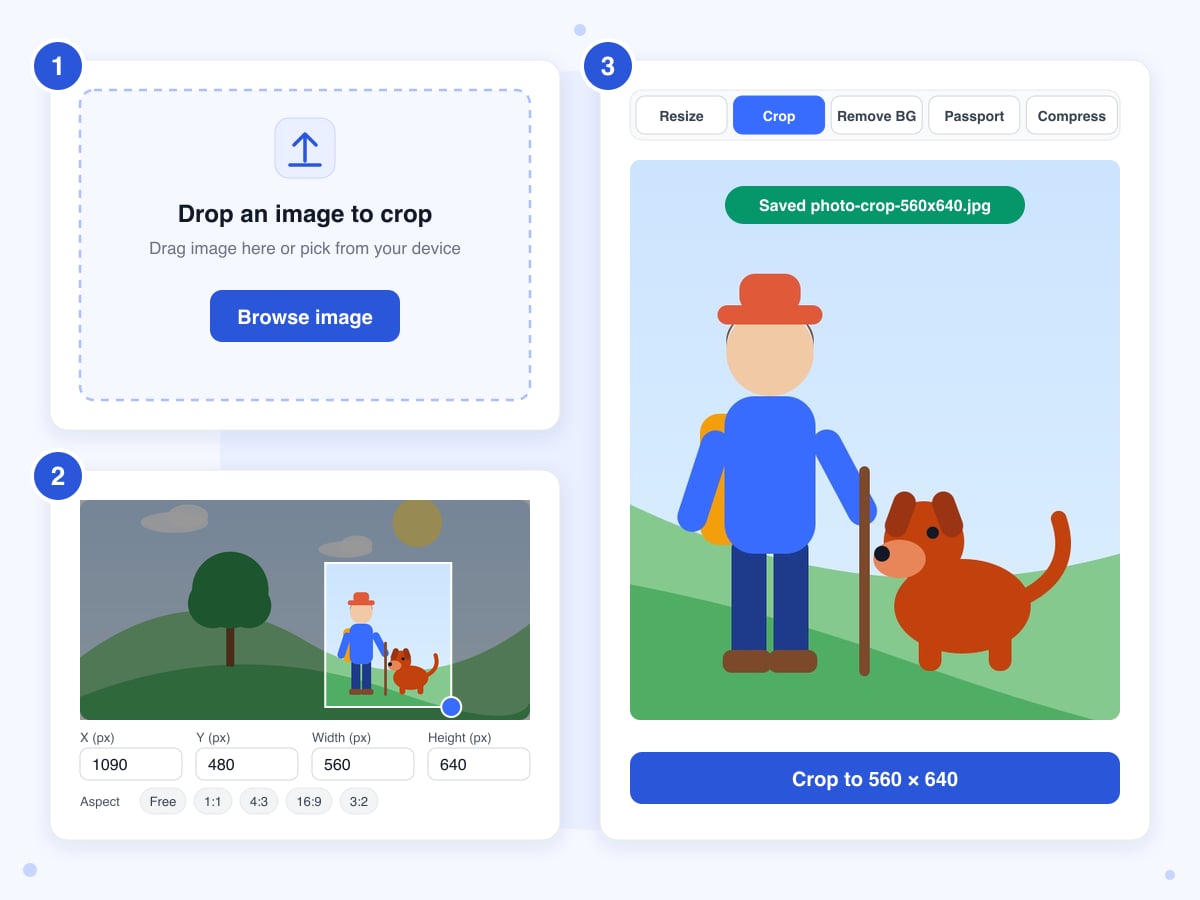
Drop it anywhere on the page, or click Browse image and choose it from your device, and the editor opens full screen with the Crop tab already selected.
- 2
Set the crop box
Drag the box to move it, and pull the blue handle at its bottom-right corner to change its size. When you need an exact area, type the X, Y, Width and Height in pixels, or tap one of the ratio buttons to set the height from whatever width the box has at that moment.
- 3
Crop and save
The button shows the size you'll get, such as Crop to 1600 × 1200, and clicking it downloads the file straight away, named after the original with the crop size added, for example hike-crop-1600x1200.jpg. Press Esc or click the red X at the top to close the editor whenever you want to pick another photo.
Guide
Cropping a photo to size: pixels, ratios and what happens to quality
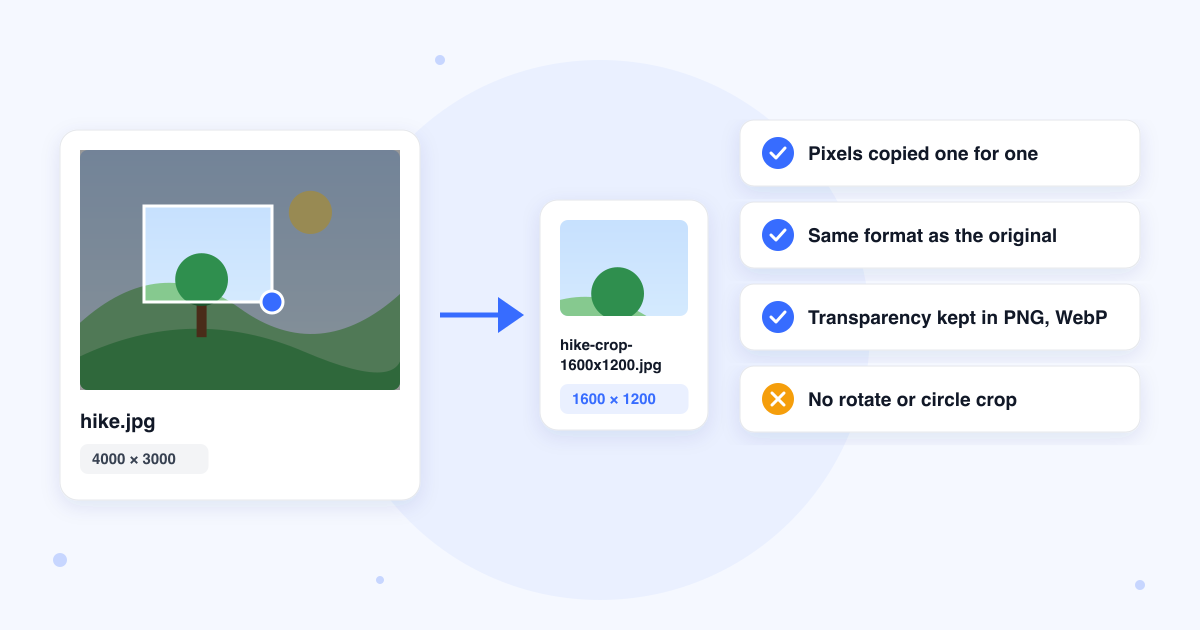
The crop copies the pixels inside the box, one for one, into a new file in the same format as the one you opened. Nothing is scaled or resampled, so a 1,600 by 1,200 box drawn on a 4,000 by 3,000 photo produces a 1,600 by 1,200 file, and everything outside the box is left out of it.
The work is done by the canvas built into your browser, which means the speed depends on your own device rather than on a server, and the editor keeps working even if your connection drops once it's open.
Getting an exact size
Type the Width and Height you need into the boxes on the right, then drag the box over the part of the photo you want to keep. The box can't reach past the edge of the photo, and the limit is measured from where the box sits, so a width that doesn't fit between the box's current position and the right edge is pulled back. Move the box to the top-left corner first, type the numbers, and then drag it into place. When the result has to be bigger than the photo, crop first and then enlarge the file with Image Upscaler.
How the ratio buttons work
A ratio button changes the height to match the current width once, so a 1,200 pixel wide box becomes 1,200 by 675 the moment you tap 16:9. The ratio doesn't stay locked, however, and dragging the corner handle afterwards changes both sides freely. The reliable order is to set the width, tap the ratio, and then position the box by dragging its middle rather than its corner.
JPG, PNG and WebP quality
A PNG is saved again without any loss, so the pixels in the crop match the original exactly. A JPG or WebP has to be encoded again when it's saved, and although the quality setting is high enough that you won't normally see a difference, the new file won't match the old one byte for byte. Transparent areas in a PNG or WebP stay transparent in the result.
Phone photos and hidden data
The crop is taken from the picture as your browser displays it, so a photo your phone stored sideways comes out the right way up. The new file carries none of the original's hidden metadata, such as the camera model or the GPS location, because the browser writes only the pixels.
What this tool doesn't do
There's no rotate, no circle or oval crop and no batch mode, so each photo is opened on its own and the result is always a rectangle. A photo for an ID or a visa is better done with Passport Photo Maker, which keeps the preset's ratio locked while you position the face and saves a JPG at the exact pixel count required. If what you need is a smaller file rather than a smaller picture, use Compress Image instead.
The other tabs in the editor
The editor that opens has Resize, Remove BG, Passport and Compress tabs beside Crop, so you can switch between tools without picking the photo again. Each tab works from the original file rather than from the previous result, which means you can't crop and then resize the cropped version in a single session. Remove BG is the only tab that sends the photo to our server.
Last updated: 21 October 2026 · ChangeMyFile
FAQ
Image cropping questions
At a glance
- Images you can open
- JPG, PNG, WebP
- File size limit
- 50 MB
- Images at a time
- One
- Ratio buttons
- 1:1, 4:3, 16:9, 3:2
- Exact size
- X, Y, width and height in pixels
- Result
- Same format as the original
- JPG and WebP quality
- 92%
- Where it runs
- In your browser, no upload
- Account
- Not needed
- Watermark
- None
Can't find your answer? Visit our Help center.