
Restore Old Photos
Upload a scan or a phone photo of an old print and get a cleaned-up copy back. Black and white photos come back in color.
Drop an old photo to restore
Drag image here or pick from your device
Max file size: 50MB
How to
How to restore old photos
All you need is a scan of the print, or a clear phone photo of it.
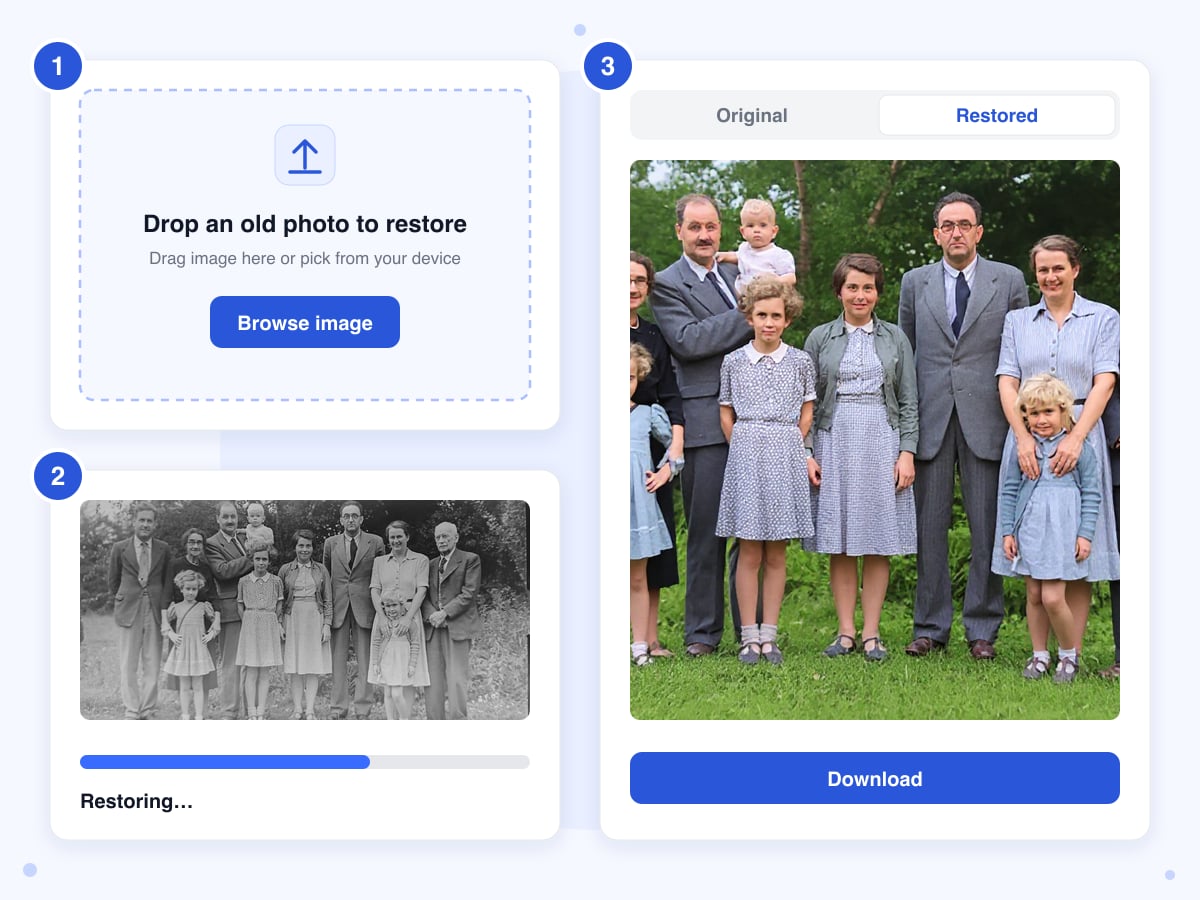
- 1
Upload the photo
Drag the image onto the upload box, or click Browse image and choose it from your device.
- 2
Wait a few seconds
Processing begins as soon as the upload finishes, and there are no settings to adjust. When the AI returns its version, the view switches to Restored automatically so you can judge the result straight away.
- 3
Compare and download
Toggle between Original and Restored and look closely at the faces, since that's where the AI is most likely to invent detail. Download the PNG before you close the tab, because the link expires after 30 minutes. Your original file isn't modified.
Guide
Restoring old photos with AI: what it fixes and what it can't
The tool sends your photo to an AI model that redraws the whole image as a clean version of itself. In a single pass it brings back faded color and sharpens soft faces, while dust and fine scratches are smoothed over along the way. A flatbed scan gives the model the most to work with, although a careful phone photo of the print is fine too.
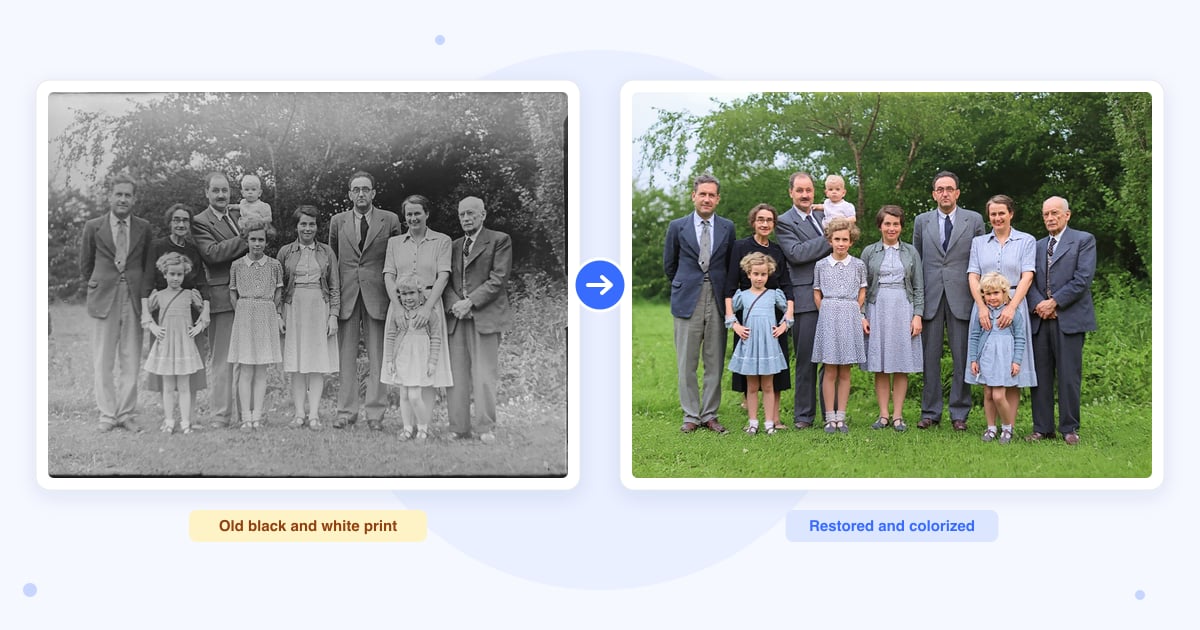
Because the model paints a new version of the photo rather than repairing the original pixels, it can fix problems that an ordinary filter can't touch. That same approach is why the result deserves a careful look before you print it.
Why a black and white photo comes back in color
Color is added automatically to black and white and sepia photos as part of the restore. The model chooses colors that look plausible for the scene, since the real ones were never recorded, so a dress or a car may come out a different shade from the original. At the moment there's no option to keep a photo in black and white.
Faces are redrawn
In the photos we've tried, faces changed the most: a soft or blurry face came back sharp. Because the AI generates that new detail itself, a face can end up looking slightly different from the real person, for example smoother or younger. Compare the two versions carefully before you share or print the photo.
Big scans come back smaller
The AI returns about the same number of pixels whatever you upload, so a small scan comes back larger and a high-resolution scan comes back smaller than the original. If you plan to print the photo at a large size, enlarge the restored file afterwards with Image Upscaler.
The edges get trimmed
In every photo we tried, the restored image came back a slightly different shape from the scan, because the AI trims the outer border. A white frame, a strip of film edge or a thin slice of the picture itself can disappear, and someone standing right at the edge of a group photo may come back partly cut off.
Heavy damage and torn edges
Dust and light scratches usually disappear. Heavier damage, such as a water stain or a blotch covering part of the image, is painted over with the AI's guess of what was underneath, and a face hidden by that damage comes back as a new face that isn't the real person. Torn edges and missing corners, on the other hand, can survive the restore unchanged.
Get a good scan first
The cleaner the input, the less the AI has to guess. Lay the print flat and photograph it straight on with the flash off to avoid glare, or better still, use a flatbed scanner. If the print is sitting on a table or inside an album page, crop it to the photo before uploading, so the AI spends its detail on the picture instead of the background.
Last updated: 21 October 2026 · ChangeMyFile
Tested: 21 October 2026, five photos. A 560 x 316 px color JPG of a worn family print: done in 9 seconds, back as a 1,392 x 752 px PNG with sharper faces and cleaner color, a few scratches near the torn edge still there. A 3,200 px wide black and white copy of the same photo came back in color, also at 1,392 x 752 px. Dorothea Lange's Migrant Mother from the Library of Congress, 821 x 1,024 px black and white: 7.6 seconds, 944 x 1,104 px, in color, the face smoother and younger than in the 1936 print, and the film border and edge markings gone. A 1910s glass plate of young men on steps from the State Archives of North Carolina, 2,400 x 1,920 px with blotches over much of the plate: 13.1 seconds, 1,104 x 944 px, in color, clean bricks and steps drawn over the blotches, the hidden faces made up, and the man at the left edge cut in half. A 1,084 x 802 px black and white photo of a family of twelve in a garden, from Unsplash: 12 seconds, 1,184 x 880 px, in color, with every face sharper, a lot of blue in the clothes, and the dark film border trimmed off.
FAQ
Photo restoration questions
At a glance
- Photos you can upload
- JPG, PNG, WebP
- Upload limit
- 50 MB
- Photos at a time
- One
- Result
- PNG, about 1 megapixel
- Time
- About 10 seconds
- Black and white
- Comes back in color
- Where it runs
- Our server and Replicate's AI service
- Files deleted
- Within 24 hours
- Account
- Not needed
- Watermark
- None
Can't find your answer? Visit our Help center.