
Paint Online
Draw, sketch or mark up a photo on a canvas that lives in your browser. Pencil, brush, shapes, text and a fill bucket, with nothing to install or upload.
How to
How to paint online
There's nothing to install and no file to upload first, because the canvas is drawn by the page itself and is ready the moment it loads.
- 1
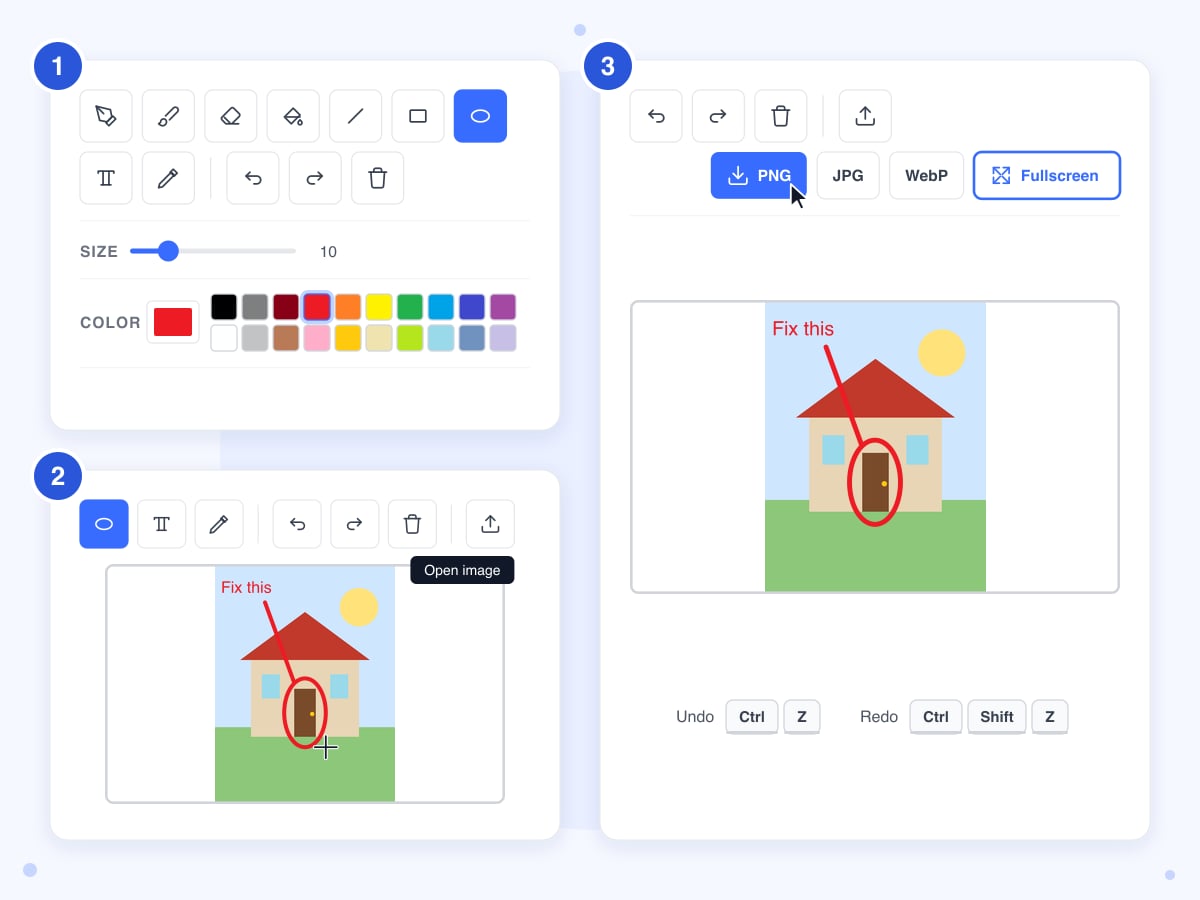
Pick a tool and a color
The buttons above the canvas start with the pencil and end with the color picker, which reads a color off the canvas instead of painting. Click a swatch, or the color box beside the swatches to mix any shade you like, and move the Size slider to decide how thick the next stroke will be.
- 2
Draw, or open a photo to mark up
Drag with the mouse or your finger to draw freehand; for a line, rectangle or ellipse, press where the shape should start and release where it should end. Click Open image, or drop a photo onto the canvas, to draw over a picture instead of a blank sheet, and use the text tool to type a caption in a small dialog that is then painted where you clicked.
- 3
Fix mistakes and download
Undo takes back the last stroke, shape or fill, as does Ctrl+Z (Cmd+Z on a Mac), while Ctrl+Y or Ctrl+Shift+Z brings it back again. The trash button clears the whole sheet to white, which is undoable too. When you're done, click PNG, JPG or WebP at the top right and a file named paint in that format is saved to your device.
Guide
Online paint: how the canvas works and where it stops
The canvas is a plain bitmap, the same idea a desktop paint program has used for decades. Every stroke, shape and word is painted straight into the pixels, so there are no layers, and nothing can be selected or dragged once it's down. That's what keeps it quick for a sketch or a note on a screenshot, and it's also the reason for most of the limits below.
The size slider is the one setting that changes how every tool behaves. At the same slider value the brush and the eraser paint about four times wider than the pencil, and the outline of a shape sits in between. The ranges run from a 1 px pencil to an 80 px brush, and the text tool follows the slider too, from 12 px letters up to 160 px, so make a short test stroke before a long one whenever you change tools.
Painting on a photo: it is scaled to fit the canvas
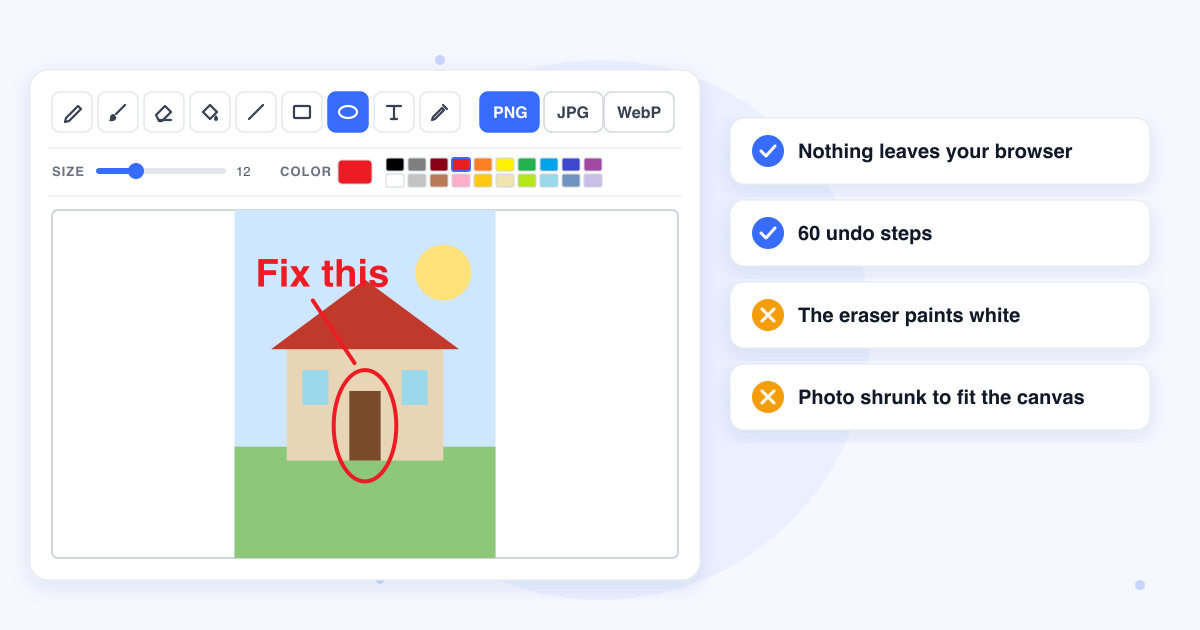
An image you open is scaled to fit inside the canvas and centered, with white space on the sides it doesn't cover, and the file you download has the canvas's size rather than the photo's. A 4,000 px wide phone photo comes back a quarter as wide, which is fine for a quick note on a screenshot before you send it. A photo smaller than the canvas is enlarged to fill it, and it comes back soft, because the same detail is spread over more pixels. If the marks need to end up on the full-size original, this isn't the tool for the job. To mark up a PDF page at its real size, use Draw on PDF instead.
The eraser paints white
The eraser isn't a true eraser, because it paints white, the color of the empty canvas, at the same width as the brush. On a blank sheet that comes to the same thing, but on a photo it leaves a white streak instead of bringing back what was underneath. To take back a mark on a photo, use Undo, which puts the pixels back exactly. The same white sits behind every download, so a PNG from here never has a transparent background.
Shapes are outlines, and the fill bucket wants flat color
The line, rectangle and ellipse tools draw an outline in the current color, with no fill option and no arrow tool. For a solid box, draw the rectangle and click inside it with the fill bucket, which recolors every connected pixel that exactly matches the one you clicked, so it works on a shape you drew or a flat area of a diagram. On a photo or a JPG screenshot, where neighboring pixels differ a little, it changes a handful of pixels and seems to do nothing.
Text goes down once
The text tool paints your words in a plain sans-serif font at the point you clicked. There's no box to drag afterwards, no second font and no bold, so if it lands in the wrong spot, undo it and click again. The dialog accepts a single line, so a second line means a second click, placed a little lower.
A refresh wipes the canvas
Nothing is stored, not on our side and not in your browser, so reloading the page or closing the tab leaves you with a blank sheet. Download a PNG whenever you reach a point you'd mind losing. You can open that PNG again later and carry on, and because it's the same size as the canvas it fits exactly, with no white bars.
Phones, tablets and a stylus
Drawing works with a finger or a stylus on a touch screen, and the page stops scrolling while your finger is on the canvas so a stroke doesn't move the page instead. Pressure isn't read, so a stylus draws at the slider width however hard you press. On a laptop, the Fullscreen button hides everything except the toolbar and the canvas, which gives you the most room to work in.
Last updated: 21 October 2026 · ChangeMyFile
FAQ
Online paint questions
At a glance
- Drawing tools
- Nine
- Canvas
- 1000 x 600 px, fixed
- Colors
- 20 swatches, or any color
- Undo
- 60 steps
- Layers
- None
- Open an image
- Any image your browser can open, such as JPG, PNG, WebP or GIF
- Where it runs
- In your browser only
- Account
- Not needed
- Watermark
- None
Can't find your answer? Visit our Help center.