
Compress Video
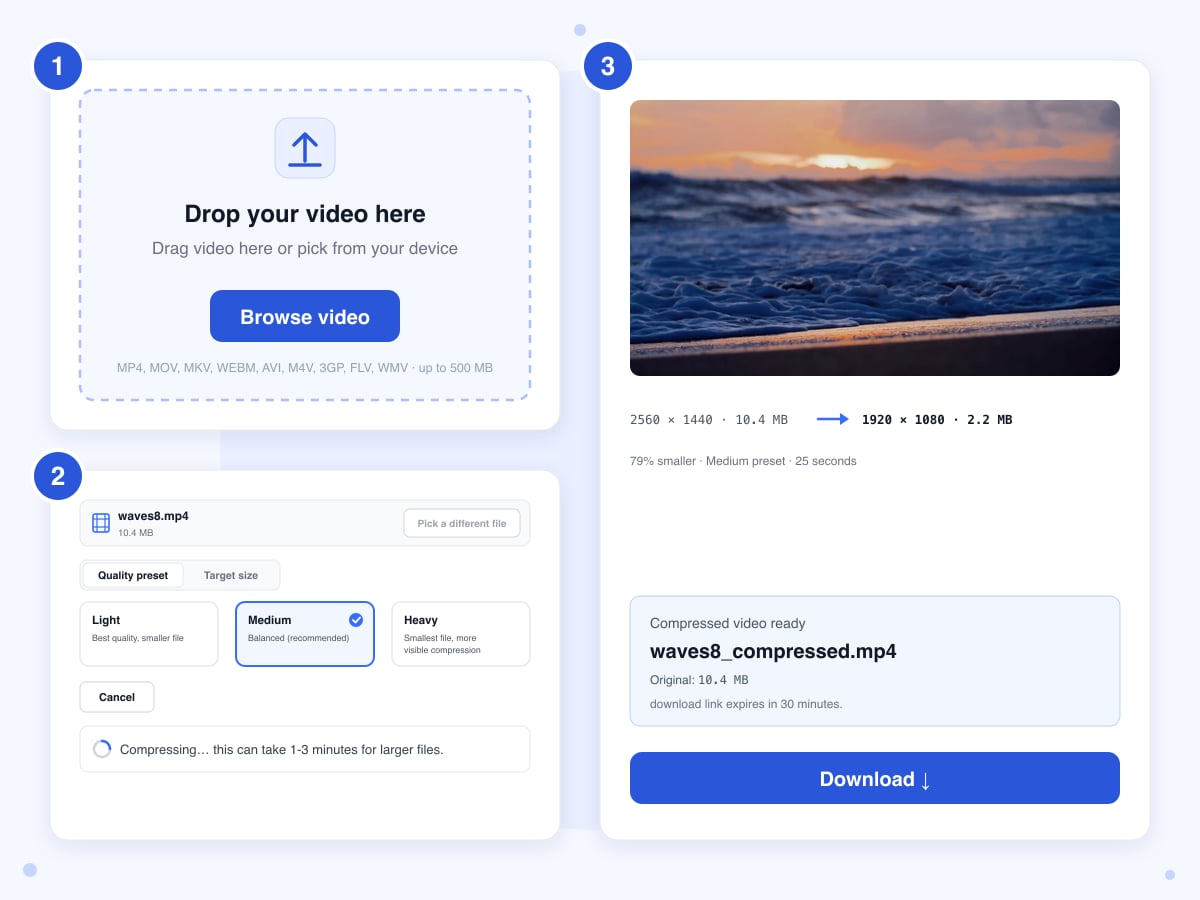
Upload a video up to 500 MB, pick a quality preset or type the size you need, and download a smaller MP4. Our 10.4 MB test clip came back at 2.2 MB on the default preset.
Drop your video here
Drag video here or pick from your device
MP4, MOV, MKV, WEBM, AVI, M4V, 3GP, FLV, WMV · up to 500 MB
How to
How to compress a video to a smaller file
One video at a time, straight from a phone or a screen recorder, in any of the nine formats the upload box lists.
- 1
Upload the video
Drag a video onto the upload box, or click Browse video and pick it from your device. The panel that opens shows the file's name and size in its header, and Pick a different file swaps it for another one without reloading the page.
- 2
Choose a preset or a target size
Medium is selected when the panel opens and is the right pick for most clips, since it took our 10.4 MB test file to 2.2 MB. Light shrinks the file least and keeps every pixel, while Heavy shrinks it most and drops the picture to 720p. If you have a hard limit to meet, click Target size and type the megabytes, or tap one of the chips for 8, 16, 25 or 100 MB. A target bigger than the file is refused with a message.
- 3
Compress and download
Click Compress and download. The upload bar fills first, then Compressing… shows while our server works on the file: 13 to 25 seconds for our 8-second clips and 47 seconds for the 18-second one. When Compressed video ready appears, click Download and save the file within 30 minutes, after which the link stops working.
Guide
What Light, Medium, Heavy and Target size do to a video
Every run rebuilds the video from scratch as a standard MP4 that plays on almost anything, with the sound saved at good quality, which takes about 1 MB per minute. The file is also arranged so it starts playing before it has fully downloaded. Nothing is ever just copied across, and even Light processes the whole video again, which is why a file that another app has already squeezed hard may come back close to its original size. The two modes differ in how they decide how much data each second of video gets.
A preset sets a quality level and a limit on height. At a fixed quality, the server spends more data on busy scenes and less on still ones, so the final size depends on the footage, and anything taller than the limit is scaled down. Target size works the other way round: the server reads how long the clip is, works out how much data per second fits your number with 8 percent to spare, and sticks to that for the whole clip. The pixel size is left alone in that mode.
The figures below come from one run on 21 October 2026 with an 8-second 2560 by 1440 clip of 10.4 MB, plus an 18-second clip of 21.5 MB for the target test. To judge quality we used a standard score that compares each result with the original, where 1.0 means identical, and we also paused each result on the same frame and looked.
Light: full pixel size, highest quality
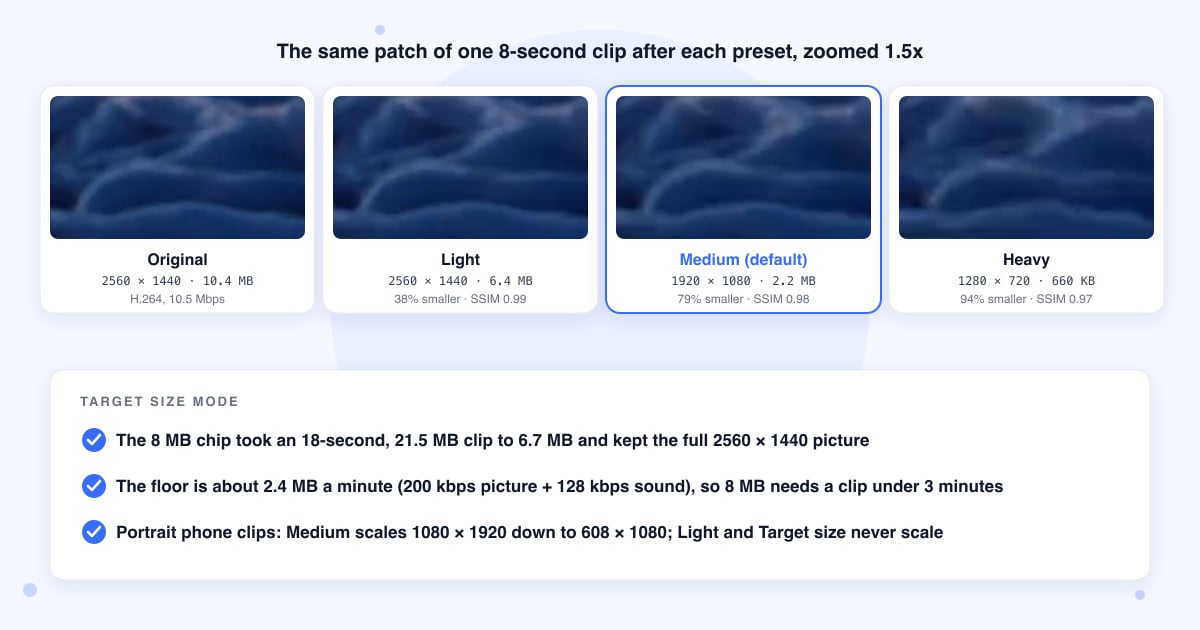
Light keeps the picture at its original size and uses the highest quality setting of the three. Our 1440p clip went from 10.4 MB to 6.4 MB, 38 percent smaller, with a score of 0.99, and at full size we couldn't tell the two apart. Phone cameras and screen recorders save their files with plenty of room to spare, which is where that 38 percent came from; a file that has been through a compressor before may barely move.
Medium: up to 1080p, medium quality
The default. Anything taller than 1080 pixels is scaled down to 1080, and the quality setting is one step below Light. The same clip came out at 1920 by 1080 and 2.2 MB, 79 percent smaller, with a score of 0.98 when scaled back up against the original: the foam on the waves is a touch softer on a paused frame and looks the same in motion. A 1080p or 720p video keeps its size and only gets the lower quality setting, so it shrinks less.
Heavy: up to 720p, lowest quality
Heavy limits the height to 720 and uses the lowest quality setting of the three, which is where compression starts to show. The clip came out at 1280 by 720 and 660 KB, 94 percent smaller, with a score of 0.97: fine on a phone screen, soft and a little blocky in the fast water on a monitor. It's the pick for a quick share in a chat, and the wrong one for anything you plan to edit again.
Portrait phone videos lose more than you expect
The caps are on height, and a portrait clip is tall. A 1080 by 1920 phone recording is over the Medium cap, so the preset scales it to 608 by 1080, and Heavy takes it to 406 by 720, while the same phone's landscape 1080p clip isn't scaled at all. If a vertical clip has to stay sharp, use Light or Target size, which never scale. To turn a sideways clip the right way up first, use Rotate Video.
Target size: what the chips mean and what you get
The chips fill in the box for you: 8 MB with a Discord hint, 16 MB WhatsApp, 25 MB email and 100 MB iMessage, and the box takes any number from 0.1 MB up. Treat the hints as a rough guide, because the services move their limits. Discord's free limit was 10 MB from late 2024 until August 2026, when it went up to 20 MB, so 8 MB is safe on any account and 18 keeps more detail; Gmail has held attachments at 25 MB for years (checked October 2026). In our test the 8 MB chip took the 21.5 MB, 18-second clip to 6.7 MB with the full 1440p picture kept. It landed under the number for two reasons: the 8 percent margin, and the room set aside for sound, which a silent clip never uses. Because the server gives every second the same amount of data instead of spending more on busy scenes, you get a little less quality per megabyte than with a preset; the score was 0.987 here, between Light and Medium.
Why a long video won't reach a small target
The picture never gets less than a set minimum of data per second, and the sound takes its own share on top, so the smallest file the tool makes is about 2.4 MB per minute, or 41 KB per second. An 8 MB target is reachable for a clip under about 3 minutes, 16 MB under 6 minutes, 25 MB under 9 and a half. Ask for less and the job still runs, but the file lands above your number, and a 20 KB video isn't possible at any length. For a long recording, cut it down to the part that matters first, or remove the sound if it doesn't need any, which drops the floor to 1.5 MB a minute.
Size limit, time and what's deleted
One file up to 500 MB. It goes from your browser straight to our storage, the server fetches it from there and deletes that copy, and the upload itself is deleted the moment the job ends. A job gets 20 minutes on the server; our short clips took 13 to 47 seconds, and the time grows with length and pixel size, with 4K the slowest. The compressed file sits behind a link that stops after 30 minutes, and a nightly cleanup removes whatever is left, so nothing stays for more than about a day.
Last updated: 21 October 2026 · ChangeMyFile
Tested: 21 October 2026, four runs on the live tool with short cuts of Pixabay stock clips. An 8-second 2560 x 1440 MP4 at 30 fps, 10.4 MB: Light gave a 6.4 MB file at 2560 x 1440 in 23 seconds; Medium a 2.2 MB file at 1920 x 1080 in 25 seconds; Heavy a 660 KB file at 1280 x 720 in 13 seconds. Target size 8 MB on an 18-second 2560 x 1440 MP4 of 21.5 MB: a 6.7 MB file at the same 2560 x 1440 in 47 seconds. All four came back as H.264 MP4 with stereo AAC, and all four played. SSIM against the originals, with the smaller ones scaled back up: Light 0.990, Medium 0.981, Heavy 0.968, Target 0.987.
FAQ
Video compression questions
At a glance
- Formats you can upload
- MP4, MOV, MKV, WebM, AVI, M4V, 3GP, FLV, WMV
- Upload limit
- 500 MB, one file
- Result
- Standard MP4 with stereo sound
- Light
- Highest quality, pixel size kept
- Medium
- Medium quality, height capped at 1080
- Heavy
- Lowest quality, height capped at 720
- Target size
- 0.1 MB and up, picture not scaled
- Smallest possible
- About 2.4 MB a minute
- Time
- 13 to 47 seconds in our tests
- Where it runs
- Our server
- Download link
- Expires after 30 minutes
- Files deleted
- Upload when the job ends, the rest nightly
- Account
- Not needed
- Watermark
- None
Can't find your answer? Visit our Help center.