
Extract Audio from Video
Upload one video in any of nine formats and download its sound track as MP3, M4A or WAV. M4A keeps the sound from a phone or camera exactly as it was recorded.
Drop your video here
Drag video here or pick from your device
MP4, MOV, MKV, WEBM, AVI, M4V, 3GP, FLV, WMV · up to 500 MB
Have several videos? The MP4 to MP3 converter takes up to 5 files at once.
How to
How to extract audio from a video
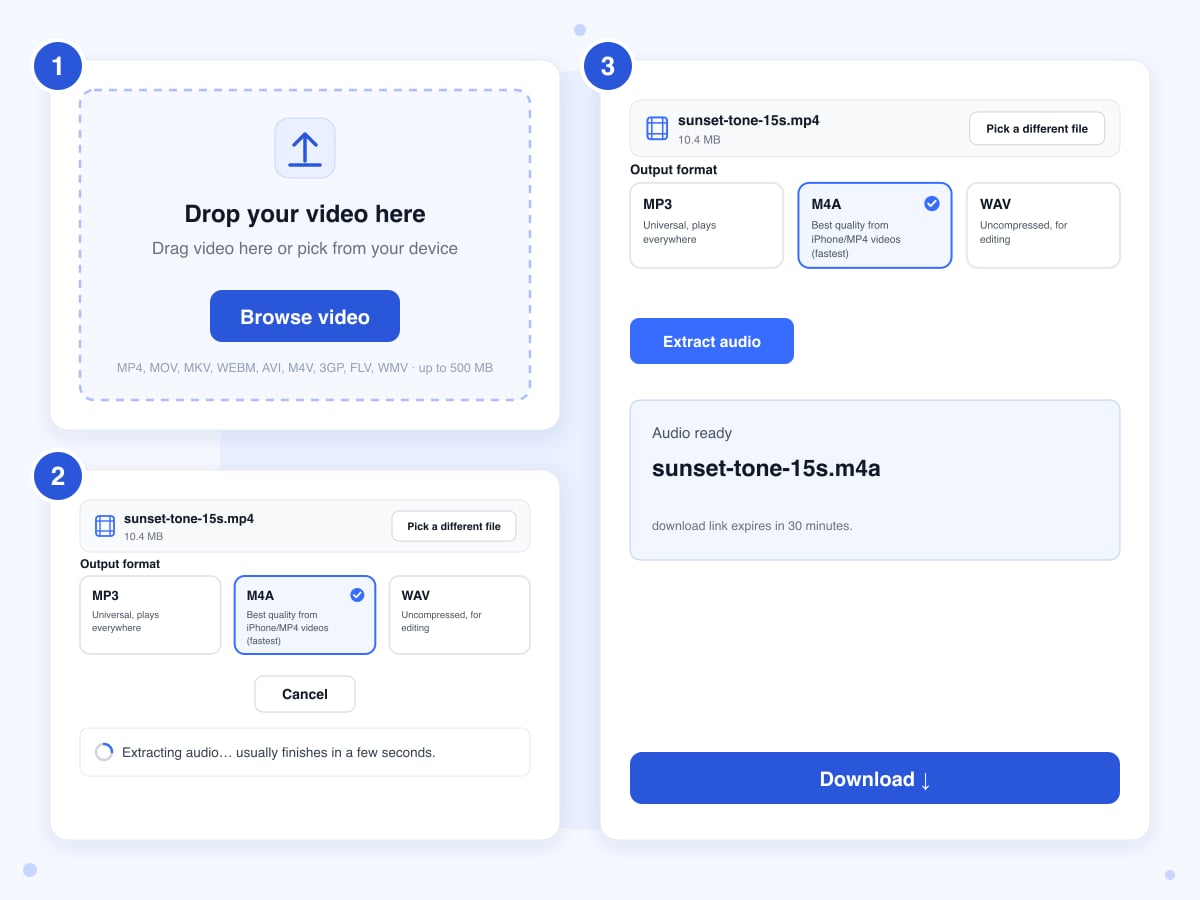
One video at a time, in any of the nine formats the upload box lists. Phone recordings, screen captures and downloaded clips all work, as long as the video has a sound track.
- 1
Upload the video
Drop the file on the upload box or click Browse video and pick it from your device, and its name and size appear in a bar at the top of the panel, where Pick a different file swaps it out if you grabbed the wrong one.
- 2
Choose MP3, M4A or WAV
MP3 is the safe pick for a phone, a car stereo or sharing. M4A is the one to choose when the video came from a phone or camera, because the sound is copied as it is, with no quality loss. WAV is for editing software, and it's big: about 10 MB for every minute of sound.
- 3
Extract and download
Click Extract audio. The upload shows a percentage, the extraction itself took 4 to 5 seconds for our 15-second test clip, and a long video spends most of its time in the upload. When Audio ready appears, click Download. The audio file has the video's name with the new extension, and the link works for 30 minutes.
Guide
MP3, M4A or WAV: which one keeps the sound of your video
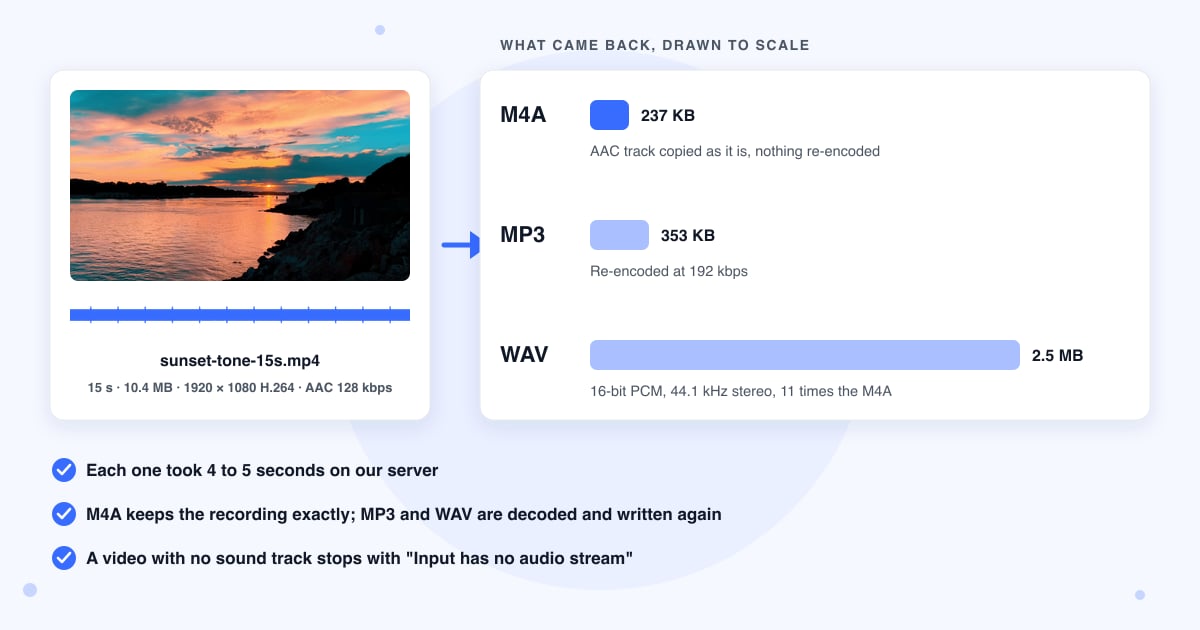
Nearly every video from a phone, a camera or a screen recorder stores its sound the same way an M4A file does, and the three buttons on this page treat that sound in three different ways. M4A lifts it out exactly as it is, in a few seconds. MP3 makes a new MP3 from it, which plays on anything but squeezes the sound a second time. WAV unpacks it into a plain, uncompressed file, which is what audio editors like best. The WAV ends up about 11 times bigger than the M4A and sounds no better, because the detail the camera threw away when it saved the video isn't coming back.
This page is the single-file tool for any video format. If you have a batch of MP4 files and only want MP3, the MP4 to MP3 page takes up to five at once. If the sound is right but you want the video itself without it, Remove Audio does the reverse of this page. The sections below cover the edge cases we found in the code and in our test run.
Videos with no sound track fail, and there's no way round it
Stock footage, GIF-style MP4s and screen recordings made with the microphone off often have no sound track at all. Our silent test clip was rejected after 4 seconds with the message "Input has no audio stream (or is corrupt)". If the video plays silently in your player too, there's nothing to pull out. A clip whose sound was cut in an editor can still carry an empty track, and that extracts fine, as a silent file.
Only the first audio track comes out
The server takes the first sound track and ignores the rest. A MKV with English and Spanish tracks gives you whichever is listed first, and a game recording with the game on one track and your voice on another gives you the game only, since the voice track is nearly always second.
When M4A is an exact copy and when it isn't
M4A copies the sound untouched only when it's already stored the M4A way, which covers MP4, MOV and M4V files from phones and cameras. Most WebM and MKV files, and AVI files with MP3 sound inside, store it differently, so the server makes a new, good-quality M4A instead, about 1.4 MB a minute. For an AVI with MP3 inside, pick MP3: the sound is still processed again, but you skip a format change for nothing. The M4A you get plays in iTunes, on iPhones and in VLC, but a few older car stereos and MP3 players won't take it.
MP3 always comes out at the same quality
There's no quality setting. Every MP3 is made at 192 kbps, a high setting where most people stop hearing a difference from the original, and takes about 1.4 MB a minute. A phone video's sound doesn't get better at that setting, because the detail lost when the phone saved it is already gone; the MP3 is a safe copy that plays anywhere, not a better one. To shrink a long lecture further, run the result through Compress Audio.
WAV is always CD quality, and large
WAV comes out at CD quality in stereo whatever went in, so a voice memo recorded on one channel comes out as two identical channels. Our 15-second clip became a 2.5 MB WAV; a one-hour recording would be about 600 MB, which some editors handle fine but most email and chat apps won't. Choose WAV when an audio or video editor is the next stop, and M4A or MP3 for everything else.
The 500 MB limit and long videos
One file at a time, up to 500 MB. The browser checks the size before uploading, and the server checks again, so a 501 MB file is refused twice. The server gives each job 10 minutes. Pulling out the sound reads the video once without touching the picture, so it's far quicker than tools that rebuild the whole video; our 10.4 MB clip was done in 4 seconds, though we haven't timed a 500 MB file. No video tool here takes more than 500 MB, so a bigger file has to be trimmed on your phone or computer first; the Photos app on an iPhone and QuickTime on a Mac both do it.
Cancel stops the page, not the server
Cancel stops the upload, or stops the page waiting for the result, at any point before Audio ready. Once the server has the file, it finishes the job anyway and the audio sits unused until the nightly cleanup. You always get the whole sound track, from the first frame to the last; the only way to a shorter piece is to extract it all and trim the result.
Last updated: 21 October 2026 · ChangeMyFile
Tested: 21 October 2026, four runs on the live tool. Because the free Pixabay stock clips we use for testing have silent sound tracks, we made a 15-second, 10.4 MB test video with ffmpeg: a 1920 x 1080 H.264 picture from a Pixabay sunset clip with a generated 440 Hz beeping tone as its AAC track, 128 kbps, 48 kHz stereo. M4A: done in 4 seconds, 237 KB, AAC at 48 kHz and 127 kbps, the same codec, sample rate and bitrate as the input, so the track was copied, not re-encoded. MP3: done in 5 seconds, 353 KB, 192 kbps at 48 kHz, same loudness as the source to within 0.2 dB. WAV: done in 4 seconds, 2.5 MB, 16-bit PCM at 44.1 kHz stereo. An 8-second Pixabay clip with no audio stream at all: failed after 4 seconds with "Input has no audio stream (or is corrupt)".
FAQ
Audio extraction questions
At a glance
- Formats you can upload
- MP4, MOV, MKV, WebM, AVI, M4V, 3GP, FLV, WMV
- Files per run
- One, up to 500 MB
- Output
- MP3, M4A or WAV
- MP3
- High quality, about 1.4 MB a minute
- M4A
- Exact copy for phone and camera videos
- WAV
- CD quality, about 10 MB a minute
- Audio tracks
- First track only
- Time
- 4 to 5 seconds for a 15-second clip
- Where it runs
- Our server
- Download link
- Expires after 30 minutes
- Files deleted
- Upload when the job ends, the rest nightly
- Account
- Not needed
- Watermark
- None
Can't find your answer? Visit our Help center.