
Edit PDF
Click a paragraph to change its words, or add text, images, shapes and stamps, then download the edited PDF.
Select a PDF file to edit
Drop your PDF here
Drag file here or pick from your device
How to
How to edit a PDF
You need the PDF saved on the device you are using. There is nothing to install.
- 1
Open the PDF
Drag it into the dashed box or click Browse file. The pages open in the editor with a thumbnail of each one down the left side.
- 2
Click the words you want to change, or pick a tool
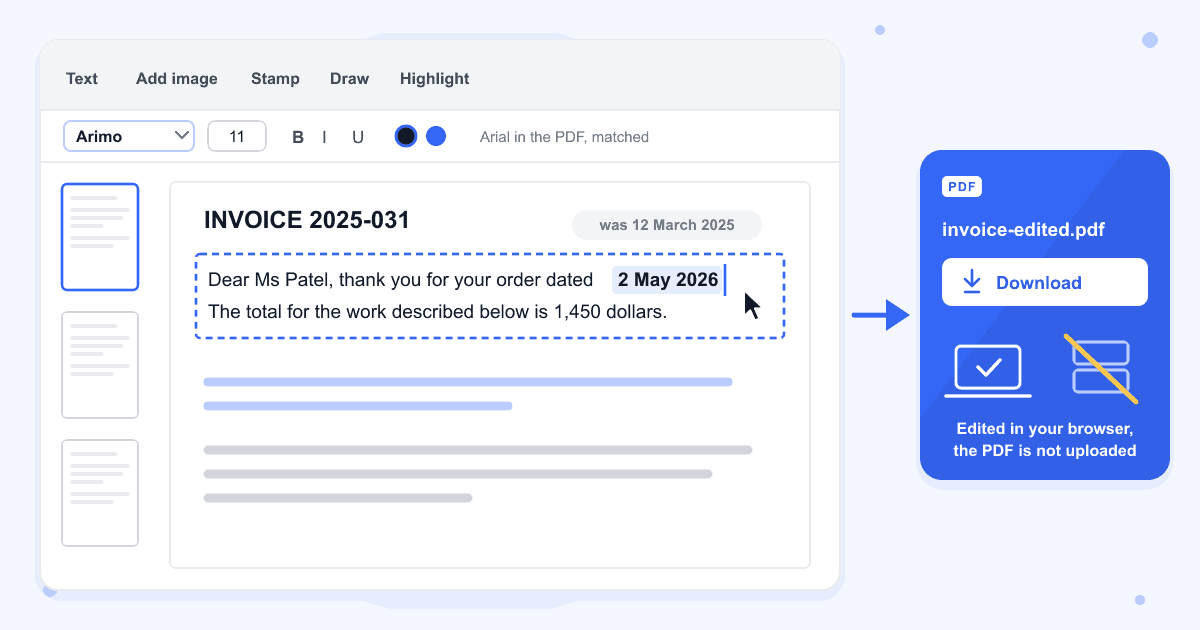
Hover over the page and each paragraph gets a dashed outline. Click one, select the words and type over them. To add something new, choose Text, Add image, Stamp, Draw, Highlight or a shape from the toolbar.
- 3
Click Download
The button is at the top right. The new copy gets -edited added to its name, so invoice.pdf downloads as invoice-edited.pdf.
Guide
Editing the text that is already in a PDF
Click a paragraph and it turns into a text box holding the same words, in a matching font, size and colour. In the saved file the new words are real text that can be selected, drawn over a box in the page's own colour that hides the old paragraph. Our test invoice kept its blue paragraph blue, and a paragraph on a pale blue panel was covered in that same pale blue.
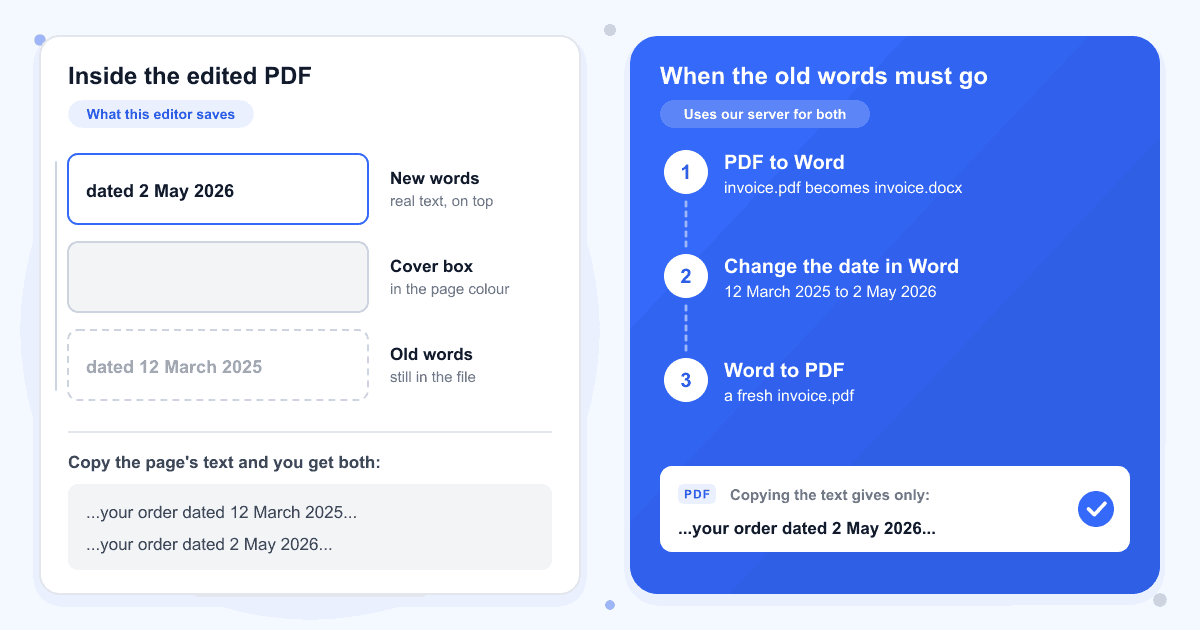
The old words are still inside the file, under that box. When we copied the text out of the edited invoice it gave the old date and the new one. If the old wording has to be gone for good, turn the PDF into a Word file with PDF to Word, make the change in Word, and save a fresh PDF with Word to PDF. Those two tools send the file to our server.
Matching the original font
Arial comes back as Arimo and Times New Roman as Tinos, free fonts with the same letter widths, and Calibri and Cambria are swapped for Carlito and Caladea in the same way. Other font names are looked up on Google Fonts, and in our test a Georgia paragraph was saved in Helvetica. Bold and italic are not picked up, so a bold heading turns regular until you click B.
Longer or shorter wording
The page does not reflow. A longer sentence makes the text box grow downward, and in our test it ran into the paragraph below, so shorten the wording or make the text a size smaller. Deleting every word in a paragraph leaves a blank space where it was.
Adding new text
The Text tool offers Helvetica, Times and Courier, the fonts found in your PDF and 24 Google Fonts, at sizes from 6 to 144 in any colour. Accented letters, Cyrillic and Greek saved correctly in our test. Chinese, Japanese, Korean, Arabic, Hindi and emoji were dropped from the saved file, with a note next to Download saying some characters were left out.
Deleting, adding and moving pages
Each thumbnail has a delete button, and a deleted page can be restored until you download. Insert page adds a blank page after the one on screen, you can drag thumbnails into a new order, and the round + button adds another PDF's pages at the end. Add that other PDF first, because adding it clears any page deletions and blank pages made before it.
Scans and password-protected PDFs
A scanned page is a single picture, so no paragraph outlines appear, but you can still put text, shapes or a signature on it. Edits can't be saved into a PDF that has a password, even one that opens without asking for it. Take it off with Remove PDF Password and edit that copy instead.
Last updated: 17 October 2026 · ChangeMyFile
Tested: 16 October 2026, in Chrome. Retyped five paragraphs of an A4 invoice set in Arial, bold Arial and Times New Roman, including a blue paragraph and one on a tinted panel, then checked the fonts, colours and text in the download. Added text in 12 languages, a rectangle, an ellipse, an arrow, a line, a freehand drawing, a highlight, a black box, an APPROVED stamp and a PNG logo; all were drawn into the page itself, with no comments or form fields added. Deleted, inserted and reordered pages, added a 2-page US Letter PDF to an A4 file, opened a 300-page PDF and removed a page from it, and opened a scanned page. Also sent the invoice through PDF to Word and Word to PDF with the date changed in Word: the new PDF held only the new date.
FAQ
Edit PDF questions
At a glance
- Existing text
- Click a paragraph to retype it
- Where it runs
- In your browser
- Saved edits
- Part of the page, not comments
- Undo
- Up to 50 steps
- Watermark
- None
Can't find your answer? Visit our Help center.