
Cut Video
Trim a video clip online. Pick start and end timestamps, hit cut, and download. No quality loss, no signup.
Drop your video here
Drag video here or pick from your device
MP4, MOV, MKV, WEBM, AVI, M4V, 3GP, FLV, WMV · up to 500 MB
See every frame, pick the exact cut
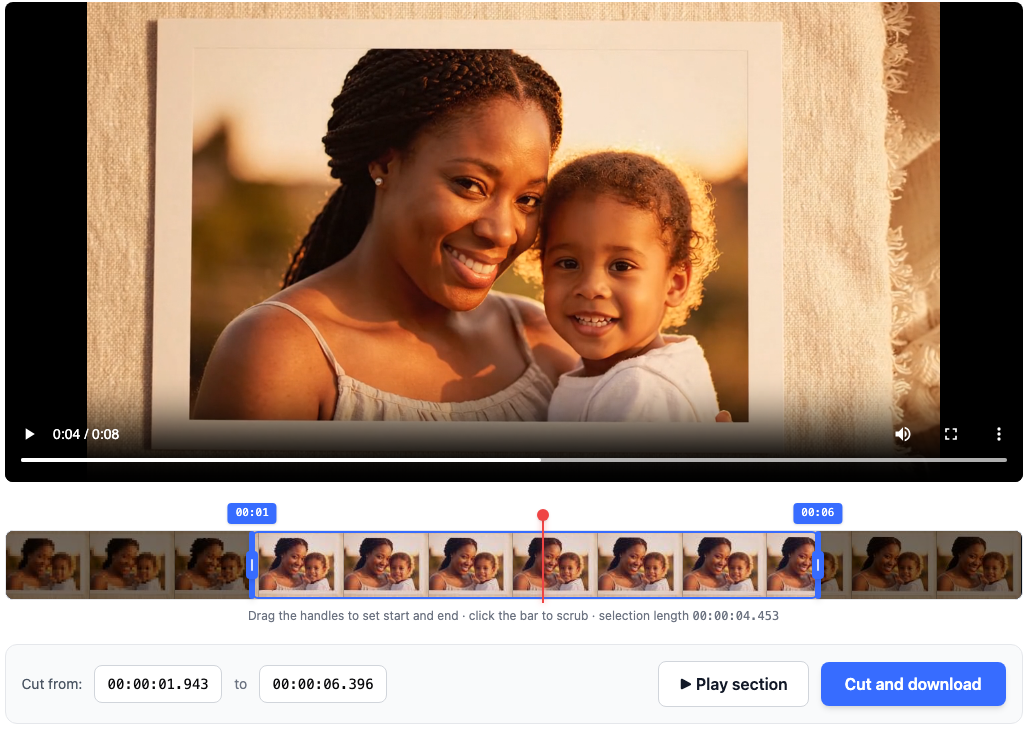
Drop your video, scrub the preview, and drag the two handles on the filmstrip to set start and end. Twelve thumbnails along the bar show you what's in the clip so you can land the cut on the right moment.
- Filmstrip bar with draggable start and end handles
- hh:mm:ss.mmm inputs for frame-level fine-tuning
- Play section to preview the selection before cutting
- Works on MP4, MOV, MKV, WebM, AVI, M4V, 3GP, FLV, WMV
- Stream-copy cut on the server keeps quality identical to the source
How it works
Three steps, usually under 10 seconds start to finish.
Drop your video file
Upload MP4, MOV, MKV, WebM, AVI, M4V, 3GP, FLV or WMV up to 500 MB. The preview loads right in your browser so you can scrub for the exact cut.
Pick start and end
Drag the two handles on the filmstrip, or type timestamps as hh:mm:ss.mmm. Press Play section to hear and watch the selection before you commit.
Cut and download
The cut runs on our servers (usually under 2 seconds) with a stream-copy that keeps quality identical to the source. The download link stays valid for 30 minutes.