
Your MMF ringtone has almost no sound inside it. That's why it won't convert
An MMF ringtone is a SMAF score for a synthesizer chip, with almost no recorded sound inside. Here's what we found in nine real handset files, and how to convert one.
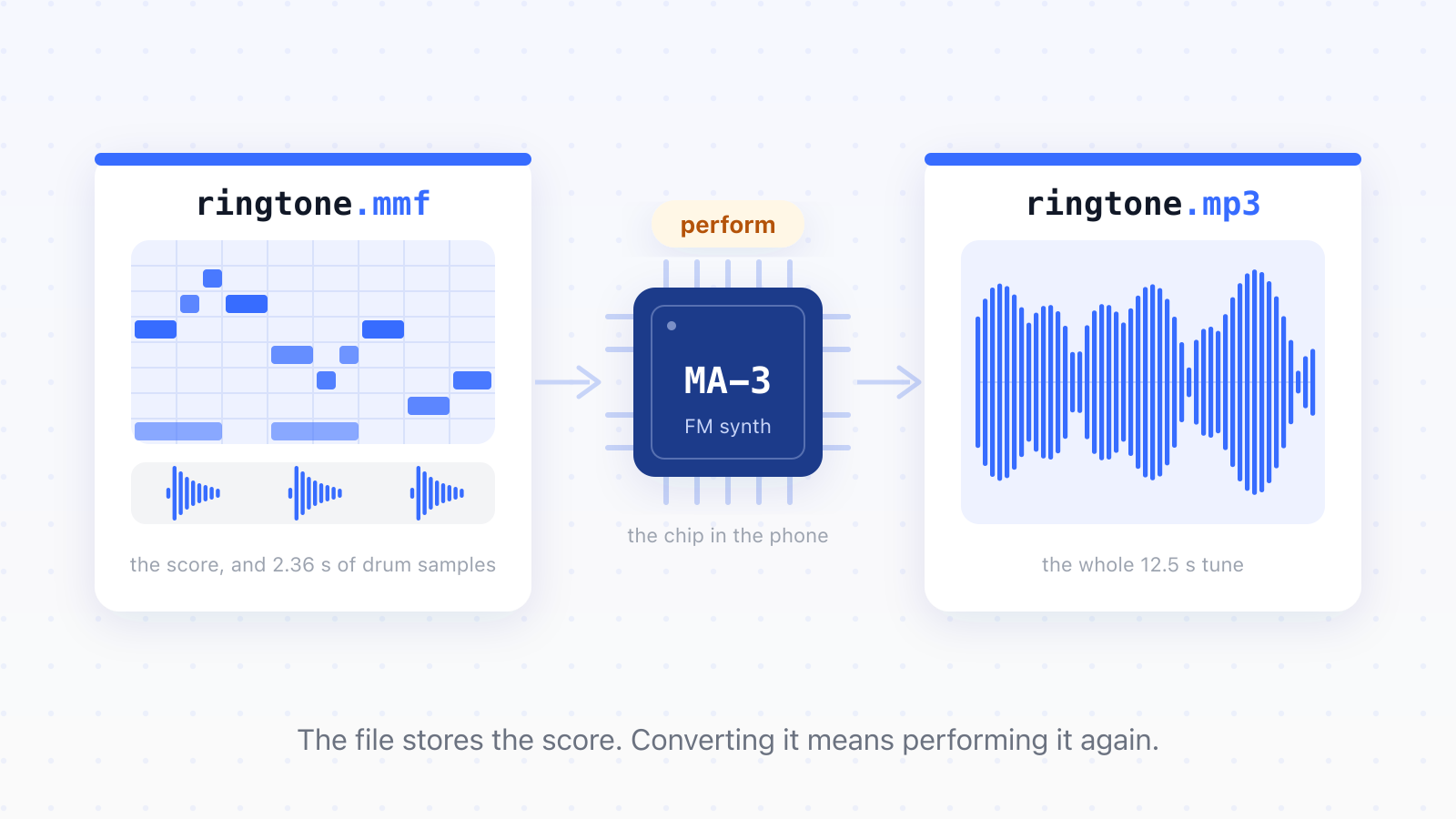
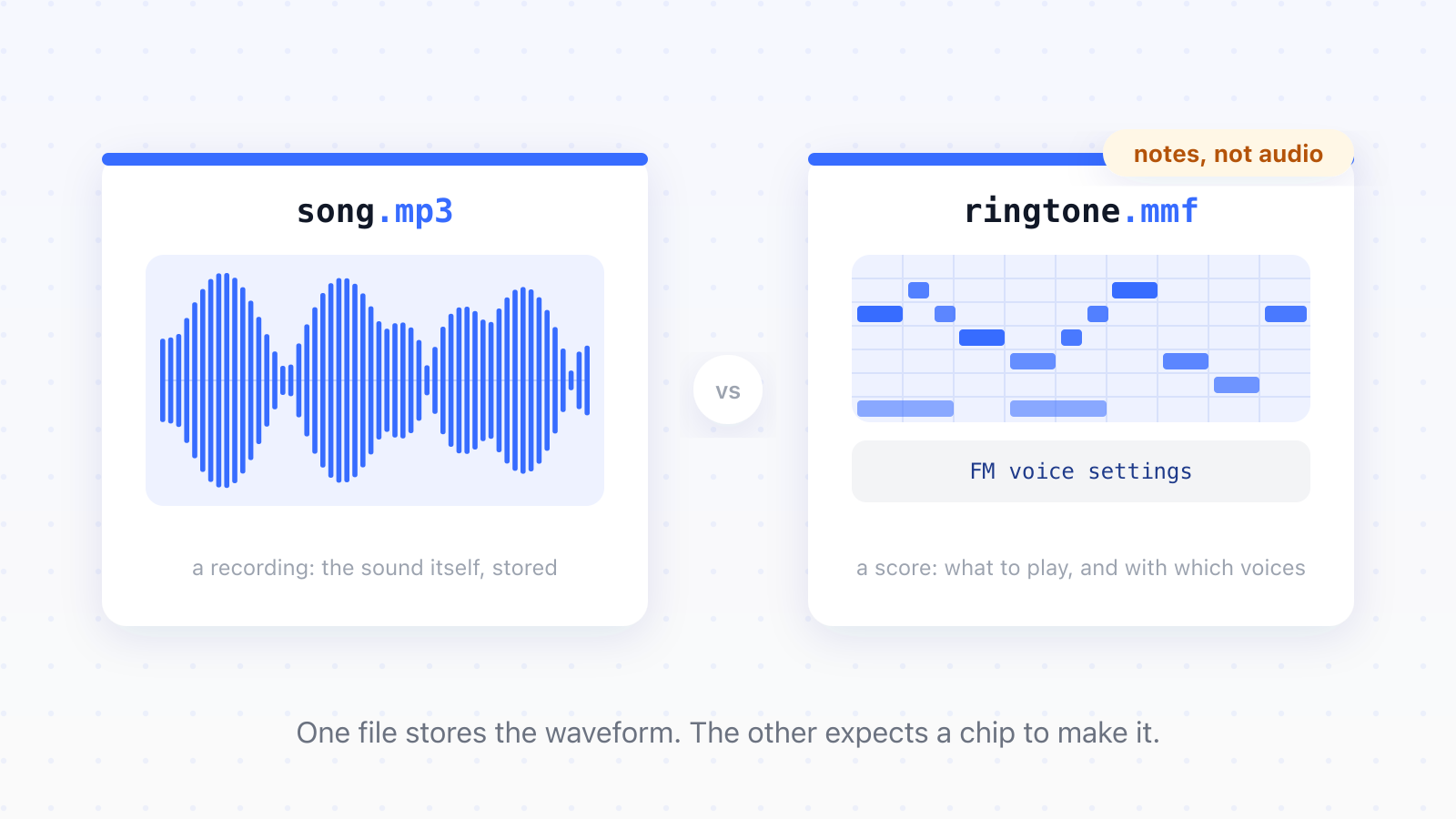
An MMF ringtone holds almost no recorded sound. What's inside is a score: MIDI-like note instructions plus synthesizer voice settings, written for a Yamaha chip that sat inside the phone and performed the tune live every time it rang. A converter that goes looking for audio to extract finds a stray fragment at best, which is why the results come out silent or a fraction of a second long. Converting an MMF honestly means performing it again.
Dozens of programs, and none of them worked
The record of failure is public. On AVForums, a member trying to move a single .mmf ringtone onto their Samsung Wave reported back a year and a half after first asking:
Still struggling to find a player or converter for this ringtone. Have installed/uninstalled literally dozens of programmes.
AVForums, January 2012
On XDA, a thread about playing MMF files opened in 2007 was still getting posts in 2026, partly because the tool it once offered vanished in a forum software migration and people keep arriving to ask where it went. What none of these threads contains is an explanation of why every program chokes on the same small file.
What an MMF file actually contains
MMF is the file extension of SMAF, a format Yamaha designed for its MA series of phone synthesizer chips. Between 1999 and 2005 those chips shipped inside phones from Samsung, LG, Panasonic and others, and they were the last mass-market use of FM synthesis. The file tells the chip which notes to play, when, and with which instrument voices. The chip does the singing. It's closer to sheet music than to a recording.
That's the whole mystery, really. ffmpeg is a decoder, not a musician; handed a score, it has nothing to decode. Its SMAF demuxer is about 330 lines of code, essentially unchanged since 2005. It handles the format's sampled-audio half and gives up at the first score track with the error "MIDI like format found, unsupported". On the real handset ringtones we tested, that's a failure rate of 100%.
The shortcut that almost worked
Many MMF files do carry an audio track next to the score, so there's a tempting shortcut: extract that audio, rebuild it into a minimal container ffmpeg accepts, and convert that. We built it, and it worked, in the sense that the audio came out byte-identical to what went in.
Then we fed it ringtones from real handsets. Funky_DEMO.mmf turned out to hold three audio chunks totalling 2.36 seconds, inside a ringtone that plays for 12.5. LMI-MA2.mmf held 1.70 seconds of audio in a 12.9-second tune. The audio track isn't the song; it's a bank of one-shot samples, drum hits and stabs that the score fires at different times and pitches. The arithmetic settles it. You can't rebuild 12.5 seconds of music out of 2.36 seconds of parts.
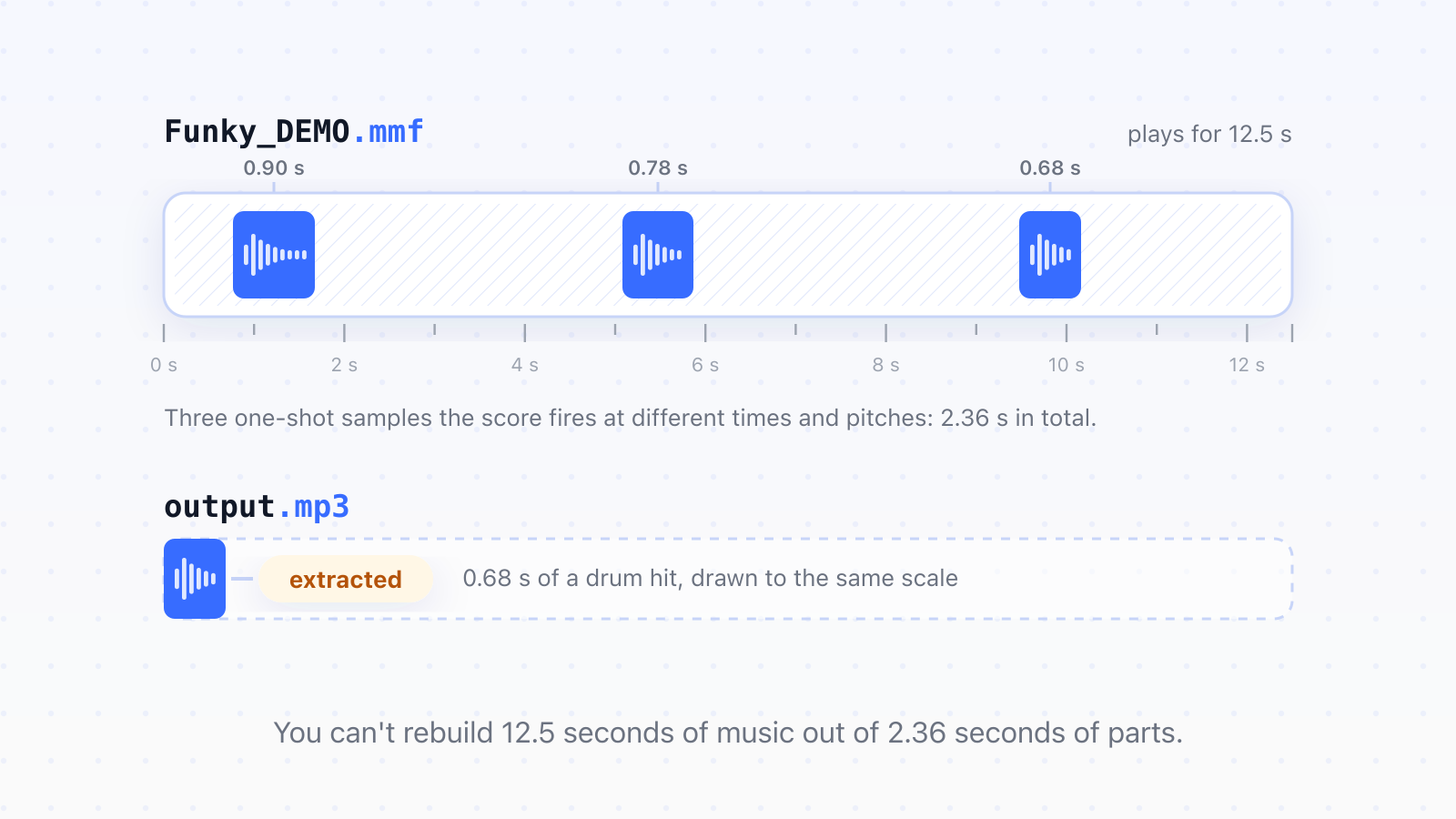
One of our outputs even "converted successfully": a valid MP3 that plays a single 0.68-second drum hit. Across nine real handset files, extraction produced a usable conversion exactly zero times. And the samples hide well. Bubble_Bubble.mmf looks score-only from the outside, but 23KB of continuous audio sits nested three chunk levels deep, in MTR > Mtsp > Mwa. ffmpeg never reaches it, because it has already quit by then.
Converting by performing
The conversion that works runs an FM synthesizer over the score, the same job the phone chip used to do. Ours builds on yamaha-smaf-player by akustikrausch, an Apache-2.0 licensed clean-room player with its own FM engine that needs none of the chip's ROM.
There's an honest limit here: this is a re-creation rather than chip emulation. You get the right notes at the right times, and a timbre that's close to the original chip's, though not identical. The exception is files that carry their own custom instrument voices. Those sound exactly as authored, because the voices live in the file, not in the chip's ROM.
The plan capped rendering at 30 seconds, which sounds generous for a ringtone. Then Bubble_Bubble.mmf measured 76 seconds long, so the cap would have silently cut 60% of the song. We caught it only because two independent methods, the synth and a separate score-to-MIDI conversion, both measured the same 76 seconds.
Hearing your ringtones in 2026
The free route first. Yamaha's own MidRadio player handled SMAF files for years, but Yamaha discontinued it; today it survives as re-uploads on the Internet Archive, and it's Windows-only. If you have a Windows machine and don't mind installing archived software, it will still play your .mmf files.
If you'd rather end up with a file any modern device plays, our MMF to MP3 converter performs the score through the FM synth described above, so the output is the whole tune instead of whatever fragment extraction happens to find.
If you want to edit the melody rather than just listen to it, you need a different conversion: MMF to MIDI. That one is possible, with a catch. The notes survive the trip, but the FM instrument voices don't, because MIDI has no way to carry them. You'll get the right tune played with a soundfont's instruments instead of the chip's.
When a converter says it worked and it didn't
Our test suite was green the whole time extraction was returning garbage. The synthetic files we'd built to exercise the format all passed; only real ringtones off real handsets exposed that the approach couldn't work. A successful-looking wrong answer is worse than an error, because nobody investigates a file that downloaded fine.
The other habit that paid off: verify what a tool does, not what the file claims. Both ffmpeg and the synth turned out to ignore the header field that declares the audio format. We didn't take that from any documentation. We flipped the byte and got byte-identical output.
So if a converter ever hands you half a second of drums in place of your 2004 ringtone, you know what it found in there. The tune is still in the file, written out as a score. It just needs something willing to play it.
Updated
- MMF
- SMAF
- ringtone
- Yamaha
- FM synthesis